Tampilkan postingan dengan label hearing impairment. Tampilkan semua postingan

Senin, 08 Desember 2014

OtoSense Mobile App: Re-Imagining Alerting Devices For Deaf, Hard Of Hearing


For Joyce Edmiston, 55, who admits she can�t hear her oven timer beeping when she removes her hearing aids, even if she�s in the kitchen, says lack of awareness of these audio alerts and other sounds can be a real problem. 

OtoSense, a sound recognition software company, has developed the first mobile app that identifies and distinguishes the source of incoming audio alerts, including alarms, sirens, timers, bells and other sounds, turning smartphones and tablets into assistive alerting devices for the deaf and hard of hearing. 

Joyce, who runs http://xpressivehandz. blogspot.com is seen here with an award.
Joyce, who runs http://xpressivehandz.
blogspot.com is seen here
with an award.
For people like Joyce and Travis Dougherty, 33, who is deaf, OtoSense offers an adaptable, affordable and useful means of being notified of important sounds in their environment.

Wherever you go, it seems, people, young and old, are using smartphones and tablets. The real value of these devices, however, comes from the mobile applications. 

Smartphones have quite literally become the new form of an assistive device - the all-in-one system that is made all that more powerful with the mobile applications available to download. Today, there are apps that let you watch (even in closed captions), text, video chat, bank, shop, read, listen, take photos and movies, check the weather, traffic and even get updated arrival and departure times during busy holiday travel season. 

Travis, who admittedly is an early adopter when it comes to new technology, says that the time has come for alerting devices to evolve and �putting this kind of technology into a smartphone and tablet just makes sense.� 

Since the birth of his daughter, Travis now wears a Pebble smartwatch, which connects to OtoSense, and he will soon connect the app to his Philips Hue Lights when the next update comes out later this month. 

Most people today have their smartphone and/or tablet within arm's reach at all times, it's the portable computer in their pocket and charging it and keeping it running is important. Certainly that�s the case for Noelle Bell, 32, who has a cochlear implant. 

OtoSense works immediately upon download, coming with a built-in library of standard fire and smoke alarm sounds found in the U.S. and Europe. Additionally, OtoSense can be personalized by users, recording and storing the most significant sounds of their environment, notifying users via flash, vibration and third-party notification including SMS text and push notification.
Noelle Bell, founder/CEO of
Buzz Worthy Social Media.
For Noelle, who pairs OtoSense with her Pebble Smartwatch, says she�s taught the app the sounds of her alarm clock, the doorbell, oven timer and dog barking. 

�It lets me know the audio cues to participate in my environment, and has helped me not feel as isolated in trying to figure out all of the different sounds of modern life,� says Noelle. �For me, the sound of the oven beeping is very similar to the sound of my doorbell, and I�ve recorded both sounds and stored them in my personal library on OtoSense. Now I can distinguish the difference between the two, and that is a real benefit.�

OtoSense is available now on the Google Play store. When the iPhone and iPad versions come out later this month, the cost of the app, on either Google Play or the App Store, will be $4.99 with some additional in-app purchases. OtoSense connects to any smartwatch, alerting user via text and vibration of a particular sound they have recorded and want to be aware of. And with the launch of the app on the App Store, users will be able to connect the app to Philips Hue Personal Wireless Lighting, customizing notifications.


According to the World Health Organization, there are 390 million people who suffer from a disabling hearing loss. In the United States, there are 48 million people who report a hearing loss according to the Hearing Loss Association of America. 

Please follow OtoSense on Twitter at www.twitter.com/otosense, like us on Facebook at www.facebook.com/otosense, and Instagram at www.instagram/otosense. If you have questions or want to sign up for our email list, please go to www.otosense.com or email us atexplorers@otosense.com.

This guest blog post was writting by Kathryn M. Quirk. Kathryn leads marketing activities for OtoSense, bringing more than 15 years of experience developing and managing multi-channel communications programs across an array of business sectors. Kathryn has insatiable thirst for news and information, reading, listening and watching everything with eye for how she can develop and share good stories, with a preference for sharing stories about how technology helps people to live more independent and autonomous lives. Always in the back in her mind, are the words of Maya Angelou, who wrote, "People will forget what you said. People will forget what you did. But people will never forget how you made them feel."

Kamis, 09 Oktober 2014

VEST: A Vest That Helps Deaf People Hear

image showing front and back of vest
 
 
We know very well that a large majority of deaf people use hearing aids or cochlear implants to amplify and hear the sounds around them. A scientist is working on another form of aid that will help deaf people convert sound to electrical signals which are sent to the brain directly - no need for an aid or implant!
 
This new aid, called VEST (Versatile Extra-Sensory Transducer) is an actual vest that a deaf person will wear under their shirt. Their (Android) smart phone will capture the sounds around them and send them to vibration motors on the vest real time, which will be converted to touch in the form of vibrations. These vibrations, or electric signals, are then sent to the brain directly where they are interpreted into information. With this vest, deaf people will be able to do several things that are typically either not possible for them or very difficult, like listening to traffic sounds in their surroundings, music, etc.
 
image showing description of how VEST works.
 
This device would cost approximately $2,000 - an eighth of what a cochlear implant surgery costs, and since this is something one just wears (and is hidden under their clothing), there is no need for a medical surgery.
 
The inventor of VEST, David Eagleman, also plans to send weather, stock market information, and tweets directly to this vest in the future. As an example, if the wearer of VEST were in a room where people were tweeting with a certain hashtag, they would get all those tweets directly into their brain!

Data around them will get directly streamed to their brain!
 
This vest weighs around 10 lbs but future enhancements include shedding that extra weight off.
 
Eagleman will be posting regular VEST updates on his website here.
 
Watch this Kickstarter video (that was successfully funded just yesterday to learn more about VEST and what all it can do.


Watch this three minute video to understand the bigger theoretical concepts behind VEST.


And here's a very amazing presentation by David Eagleman at Being Human last year. It's 22 minutes long but totally worth watching!


Source: Medical Daily, Kickstarter, Eagleman Laboratory

Minggu, 24 Agustus 2014

Assistive Technology Gadgets That Could Change Your Life [Infographic]

Are you or someone you know an Occupational Therapist and/or take care of someone with special needs? Michael Leavy at Home Healthcare Adaptations, a family run company has created this helpful infographic that shows some really useful assistive technology devices that can make life convenient for a lot of people. 

An electric car that people in wheelchairs maneuver  without getting off and folding the wheelchair separately? A gadget that translates head movements into computer mouse movements? Alarm clocks for the deaf? Bookmark this handy infographic for quick reference to some really cool assistive technology gadgets. (click to enlarge)

infographic titled assistive technology gadgets that could change your life
Click to enlarge

Source: Michael Leavy

Minggu, 10 Agustus 2014

Talkitt - App/ Software That Lets People With Speech Impairment Communicate In Any Language Using Their Voice

image showing talkitt for different devices - computer, tablet, smartphone, wearable devices like google glass and smart watch.


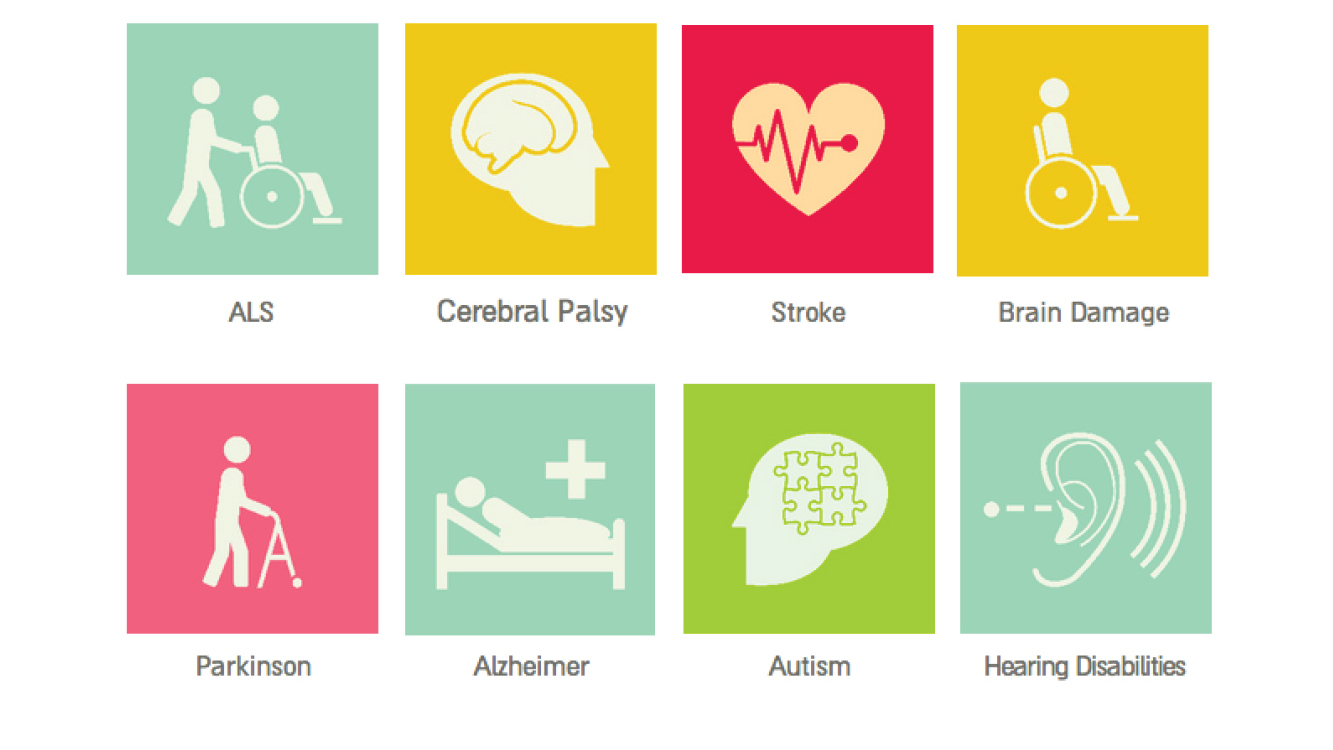
image showing various medical conditions that can cause speech impairment - ALS, cerebral palsy, stroke, brain damagem parkinson, alzheimer, autism, hearing disabilitiesIn many cases, disabled users with speech disorders find it extremely difficult to communicate, primarily because people around them have difficulty understanding their speech. Speech disabilities can be caused by a variety of conditions including Cerebral Palsy, Autism, Brain Damage, Parkinson's and many more. It is a struggle not just for those who have speech disorders but also for their caregivers and loved ones. In the recent past, various companies have come up with text to speech apps and software that let users either type or choose words that are spoken by the app, and thus help the users communicate. However, the one aspect that these apps sideline is the fact that the users are very much capable of speech and would ideally like to use their natural mode of communication.


a lady with speech impairment ordering coffee at a coffee shop using talkitt on a tablet.
Talkitt, a new "speech to speech" app in the works, plans to give disabled users more freedom and expression in the most natural way possible - it helps them communicate by just using their voice. Talkitt has the ability to recognize the user's vocal patterns and translate them into words that are more understandable. As you will see in the video below, it does a very good job of translating unintelligible pronunciation into perfect sentences with utmost accuracy. This also means that Talkitt works very well with any spectrum of speech severity - from mild to extreme.The best part about this app is that it is not just limited to English - it can translate any language the user is speaking! 

The accuracy of this app will let users gain more confidence, and encourage them more to use their speech to communicate, not to mention that it will make communicating easier and convenient for their family, friends, and caregivers as well.


Very soon, Talkitt will be available on all smartphones and tablets. The next phase will see it run on computers and wearable devices, giving much more flexibility to users wherever they are. Once Talkitt is available, there will be a monthly subscription charge of $19.99 per month.

Currently, it is being tested by various partners and hospitals in Israel and Europe, and there is also a Indiegogo funding campaign going through which the team behind Talkitt is raising money to get it out to the masses quick (as soon as Q1 of 2015). Visit the Indiegogo page if you want to contribute to this campaign.

Definitely watch the video below to see the inspiration behind this app and what the team is doing to make this app a reality.

Selasa, 24 Juni 2014

Soundhawk Smart Listening System: Hearing Aid With Smartness Built In

Soundhawk scoop (earpiece) and other accessories including wireless microphone and charging case

Hearing aids have been traditionally known  for amplifying sound around the person wearing them. OF course, this works very well in all cases, however, one thing the traditional hearing aid lacks is aesthetics - when it comes to design and looks, the hearing aid has not been given much love by manufacturers. This is not really a big deal except that just the size and aesthetically unappealing aspect of it have discouraged a few people from using them. 


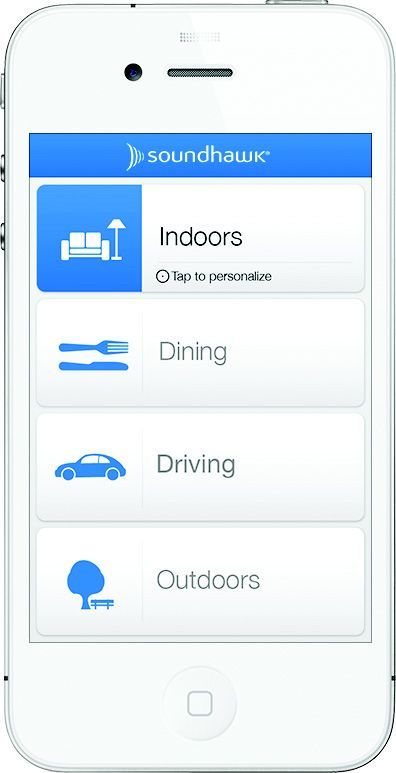
soundhawk app showing different environments it can be set toSoundhawk, a company on a mission to transform the listening experience, has introduced a new "hearing aid" that not only looks visually pleasing but comes with a lot of features that the regular hearing aid does not typically deliver. Soundhawk comes with a "Scoop" - the earpiece part that sits snugly in the ear (and doubles as a Bluetooth headset that syncs with your phone and lets you talk and listen to audio). It has a little microphone that amplifies sound around the wearer. If they are in a louder setting (think restaurant), they can use the mic (separate accessory) and place it in the direction the sound is coming from, and it picks it up and beams straight to the ear. Soundhawk is also accompanied by an app that lets you adjust the scoop to the environment you are in - outdoor indoor, dining or driving. Once selected, the wearer moves their finger on a touch interface to adjust the volume for the Scoop. 

The scoop has an eight hour battery life and the charging case extends its life to 24 hours. 


Pre-order for this device starts today at $280 and the price will go up to $300 after launch. On average, a decent hearing aid costs approximately $1,500. Head to the website to learn more and to pre-order! 

Source:  Techcrunch, Gizmodo
Video source: http://soundhawk.com/ 

Minggu, 13 Oktober 2013

TacitLanguage: Glove For The Hearing Impaired

person wearing TacitLanguage - the glove with lights to make signing easier in dar environments

To make signing simple in dim or not so well lit areas, a design student from New Zealand has developed a very simple glove called TacitLanguage that can be used by people with hearing impairment or sign language interpreters in darker environments.

The simple design consists of a glove with two lights on two fingers and four on the wrist that light up whenever the user makes movement. The movement is picked up by the attached accelerometer, and activates the lights. Although worn on just one hand, the lights are bright enough to illuminate the face and the other hand

See the video for a quick demonstration of TacitLanguage.


Source: Faesen Design via

Minggu, 14 Juli 2013

Glove That Helps Deaf-Blind People Communicate

Image Source: The Atlantic

Tom Beiling, a 32 year old doctoral candidate in Berlin, has come up with a glove that just might revolutionize the way deaf-blind people communicate, at least in the form of texting. 

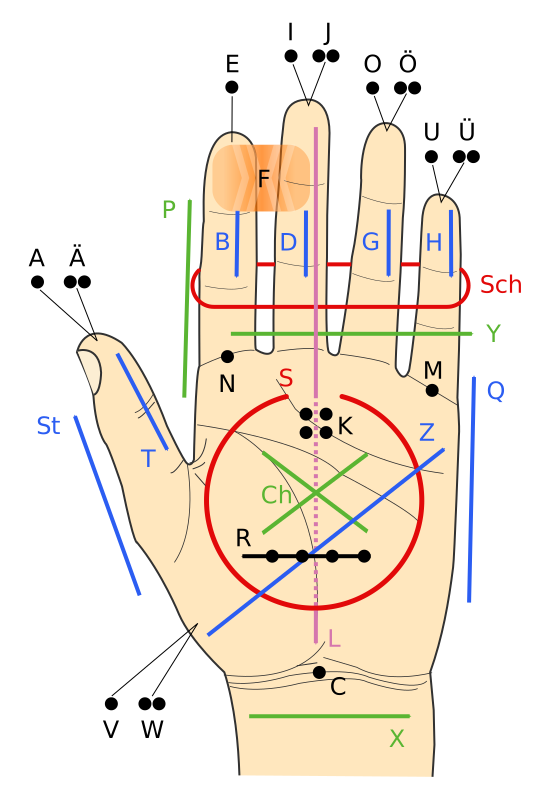
Image showing Lorm alphabetWith the intention of making communication easier between people who cannot see and hear, Tom has developed a glove that translates texts into pulses (haptic feedback). The glove consists of a set of pressure sensors, and with the help of a bluetooth device, connects to an iPhone app. The glove uses the Lorm alphabet (which places letters at different parts of  the hand (see image)), and a pressure sensor is placed at the locations that are meant for letters (for example, fingertips are meant for vowels). 

When someone needs to send text, the user just pushes the sensors meant for the alphabets that comprise of the words that they are wanting to send, and the haptic information from the tapping is converted to digital text and sent to the iphone app that sends out the message to the intended recipient. When the recipient receives the text, the motors on their glove vibrate and translate the words into vibrations, and they feel the vibrations on the pressure sensors. The vibrations essentially spell the words out. 

One advantage of using this glove to communicate is that you don't have to know Lorm alphabet to communicate  with  someone who is deaf-blind - the app converts digital text to Lorm alphabet for them. Till now, one had to know Lorm alphabet in order to communicate with people with deafblindness. 


The glove is still a prototype. Beiling's next prototype would probably be made out of material that is thinner than the one used for the current prototype.

Source: The Atlantic

Selasa, 02 April 2013

Free Captioning Service From Amara

Are you an individual or organization that has a plethora of videos that you think should be subtitled for  your viewers with hearing impairment? But because of time and financial constraints, it is not possible for you to get the videos captions with clear and understandable text (not the robotic mumbo jumbo that youtube's automatic captioning churns out)? Are you extremely appreciative of volunteers and thank them sincerely when they perform tasks for you pro bono?

Say hello to the free version of amara, the crowdsourced captioning platform.

Getting videos captioned via amara is very simple - you upload your videos to your youtube channel (as you normally do) and then visit amara.org and connect your youtube channel from their homepage. All videos from your channel are added to amara, and a link is added to every video inviting viewers to subtitle your work. Once the subtitles are added to your video, they are automatically sent to youtube, thus adding captions and updating language options on all websites where your videos are embedded!


Hit the source link to read more details.

Source: TNW via Karen Mardahl

Minggu, 28 Oktober 2012

Netflix To Caption All Its Content By 2014

Netflix logo


In a recent agreement with the National Association for the Deaf (NAD), Netflix has agreed to add captions to all its contents by the year 2014, thus making its entire catalog accessible to 48 million deaf users. Currently, 82% of Netflix's content is already captioned.

The company would also add captions on new content within 30 days by 2014; within 14 days by 2015, and within 7 days by 2016. This agreement brings to an end a class action lawsuit that NAD had filed in 2010 claiming that by not providing captions, Netflix was out of compliance with the Americans with Disabilities Act.

There are over a thousand devices that stream Netflix content. Most of these are capable of showing captions too. Netflix will do its best to make all the devices show captions, however, it is not obligated to do so.

As part of the agreement, Netflix would be paying $755,000 in legal fees to the plaintiff's lawyers, and $40,000 for implementing the decree.

Source: Ars Technica

Rabu, 22 Agustus 2012

Online Videos To Have Captions

fcc closed captioning logo
Image source: it.wikipedia.org

Deaf viewers and disability advocates have a reason to rejoice - Starting September 30, the FCC has ordered online video sites to start providing captions to their viewers. In the recent past, the lack of captions in online streaming videos has been a hot topic for debate, with deaf viewers complaining that the industry has not done much to accommodate their needs. However, with this new ruling, deaf and hard of hearing viewers will have a right to get access to captions in online videos.

Industry leaders like Youtube, Amazon, and Apple argued that they need more time, however, their plea literally fell on deaf ears. However, as of now, content providers are only required to provide just the captions and not the raw data, which means that viewers would not be able to change the font color and size as per their needs - they would have to wait 16 months to get that flexibility (early 2014). Also, this ruling covers only those contents that are created for both TV and web. Clips created by providers just for the web (news clips, webisodes, etc.) are not required to have captions starting September 30.

To read the ruling, visit this link.

Source: GigaOm

Senin, 02 Januari 2012

Subway Navigation In NYC To Become Easier For Hard Of Hearing

In a busy area like NYC where subway stations are always crowded , navigation for a person with hearing impairment can become quite uneasy. Canceling all the unnecessary noise while asking for directions or seeking more information about oncoming trains can be a daunting task.

Not anymore. 

Thanks to a device called "hearing loop" being introduced all over the city, hearing only what is important without unnecessary noise is becoming quite possible. The loop is placed close to a room or a window and sends out signals which are caught by a "t-coil" which is already inside many hearing aids and cochrain implants. The t-coil eliminates all the background noise and picks up only what is coming out of a microphone or speaker.

That's it!

To watch a detailed video and read more about this process, please go here.

Source: ny1.com via design:related


Rabu, 14 September 2011

DeafYouVideo: A Great Website For People With Hearing Impairment

I recently stumbled upon a website called DeafYouVideo  (http://deafyouvideo.blogspot.com), and was amazed by the kind of resources it has for people with hearing impairment. This website is "video heavy", and contains a lot of Youtube videos that specifically have been made for deaf people. This website has ten main sections.

Home - This is where the most recent blog post (with a video) can be found. These blog posts are about deaf people, interpreters, parents of deaf children, and bullying, to list a few. Other blog posts can be found in the "Recent Posts" section on the right bar, along with the "Most watched videos" right under the blog post. All the videos can be found in the "Video Archive" section which shows up at the bottom of every page if you keep scrolling down.

ASL: This section lists some really useful ASL resources. It primarily contains Youtube videos that teach sign language (American, British, Russian; songs etc.), and has links to businesses that provide these services.

Deaf Comedy: This section has some really entertaining and funny videos! Most of the videos have either captions or people interacting in sign language, or both. Some videos that do not have either are still funny to watch because there are no dialogues in them.

Here's one which I thought was funny!


Deaf Events: A short yet important list. I was particularly impressed by the very fist listing - H3 TV which broadcasts in sign language. Their website is www.h3.tv. Do check it out! The other listings are for a company that specializes in cruises for deaf groups, a travel guide for deaf people, and Deaflympics.

Deaf TV: Another list of websites that has videos for the deaf. This one's a longer list, and has H3TV on it too. Honestly, I did not know that there are so many websites that host videos for deaf people. One website that caught my attention on this list was http://deafbook.tv/. I did not sign up for it to explore its features, but it is a social video networking website for deaf people. I am curious about it now.

Deaf Way:  Another list of resources for the deaf - It has links to Gallaudet University ( undergraduate school for deaf and hard of hearing students), and various other associations, activists, workshops for the deaf etc.

Deaf Youtube: Another set of Youtube videos (I told you this is a "video heavy" website!) that has a lot of people communicating using sign language.

VRS: This is a list of many Video Relay Service providers.

Video Games: Not necessarily for the deaf, but very fun to play!

Last, but certainly not the least, there are quite many deaf comic strips on every page for our amusement!

So, if you, or someone you know, is deaf,  check this website out. It brings a lot of fun, entertainment, and education!

Senin, 29 Agustus 2011

"Subtitle Glasses" For Deaf Cinema Goers


People with hearing impairment love to watch movies, but there is a certain limitation that stops them from going out to the theaters...the screens do not display captions.
To combat this problem Sony UK is developing a pair of "Subtitle Glasses" which would put subtitles/closed captions on to the screen of the glasses. To the person wearing them it would seem like the subtitles are actually superimposed on the cinema screen.

They don't mention anything about how the glasses would work. I am speculating that they would have some kind of downloadable content available for specific movies that the user would download on to their glasses and take them to the movies, or they may have a built in speech to text converter.
These glasses were tested by Charlie Swinbourne (who is deaf), and he felt that the words on the subtitle glasses and the cinema screen were together, overall giving him a great experience. He thought that these glasses have massive opportunity in the future, and would really encourage people with hearing impairment to go out to the movies.

These glasses are expected to be out in the movie theaters next year.

Watch the video at the source link for more details.

Source: BBC

Minggu, 19 Juni 2011

Netflix Adds Captioning to iOS

Netflix recently announced that it has added captioning capabilities to its iOS apps on iPhone/ iPod Touch/ iPad. Turning on captioning is very easy. If captioning is available for a movie/ show you are watching, a little balloon appears right on top of the "controls bar" (where the volume bar, pause button are displayed). Clicking the little balloon brings up a list of languages in which captions are available (currently English). Choosing a language starts the captions.

netflix screenshot showing balloon that shows list of languages in which captioning is available.
Click the little balloon to see a  list of languages

netflix screenshot showing list of languages in which captioning is available
Choose language

netflix screenshot showing captions in english
Captions now turned on

Senin, 07 Maret 2011

Captioning/ Subtitles On Netflix

There is good news for people with hearing impairment! The popular video streaming website Netflix has added subtitles (in English) to 30% of its content available for streaming, and the company's target is to add subtitles to 80% of its online content by the end of this year.

Subtitles are supported on PCs and Macs, as well as most of the devices that stream Netflix to TVs, like Playstation 3, Nintendo Wii, Boxee Box and Google TV. XBox 360 and Roku player are expected to support subtitles later this year.

Turning on subtitles on Netflix is extremely easy. Any movie or TV show that has subtitles shows a "Subtitles" button on the player. Clicking on the button shows the languages subtitles are available in. Selecting a language would turn on the subtitles. The same button can be used to turn off subtitles.


The devices that stream Netflix content have the "Audio and Subtitles" option.


Here is the list of all the content that has subtitles now. TV shows like Dexter, Lost, The 70s Show, Weeds, Scrubs and movies like District 9, Prince of Persia, Free Willy, and many animated movies have subtitles now.

Source: Netflix Blog

Sabtu, 26 Februari 2011

Captioning On Youtube

There are some very friendly and extremely simple features on Youtube that let you add captions to your videos for your audience that may have speech impairment.

If you are the owner of a video, Youtube lets you do two things with respect to captioning.

Automatic Captioning: Basically, you don't have to do anything to add captions to your videos. Under "CC" (at the bottom of the player), you will find an option called "Transcribe Audio". If clicked, Youtube  automatically uses its speech to text algorithm and starts showing captions at the bottom of the screen. This is the same algorithm that is used by Google Voice. The captioning is pretty decent, but not accurate. Still, it does a fantastic job of creating automatic captions from just the audio speech available in the video. 

Note: As of now, only "participating channels" have access to this feature, but hopefully it will be released to all uploaders soon. To check if this feature is available to you, go to your uploaded videos, and under one of your videos click "Insights", and choose "Captions and Subtitles". If you see "English: Machine Transcription" under "Available Caption Tracks" then Automatic Captioning would work on your video.

Another note: It seems like Automatic Captioning works really well on videos with clear audio.

Check out this video. The audio in this video is very crisp and clear, and the people in this video are speaking at what seems to be the average rate of speech.


Here's another video that I made around an year ago with a friend. My friend's rate of speech is average too, but the audio does not seem to be very crisp and clear (the audio was captured using just the phone mic). Needless to say, Automatic Captioning on this video is pretty much terrible.


Automatic Timing: If you want to use your own transcripts, Youtube allows you to add transcripts in a very simple text format, and automatically detects when the words are spoken. There is absolutely no need to add time codes (unlike the SubViewer transcript files that require time codes in front of every sentence in the file, making the entire process very cumbersome). The transcript file would be a simple text file that has all the dialogs from the video.

This feature is available to all video uploaders.

Please watch this video to learn more about Automatic Captioning and Automatic Timing:


Hit the source link to read more about Automatic Captioning and Timing on Youtube.

Source: The Official Google Blog

Senin, 21 Februari 2011

Accessibility Video Tutorials For Websites

Think Vitamin Membership recently made all its accessibility tutorial videos free. Think Vitamin is a website for web developers, and has many video tutorials on the latest technology that web designers and developers need to know in order to design websites. The videos are available in different resolutions (including HD), and their tutorials are very easy to understand.

There is actually a membership cost to access their videos, but recently they made their accessibility tutorial videos available to everyone for free. The tutorial consists of  21 very easy to understand lessons. It starts with the fundamentals - some basic things to keep in mind while designing pages for people with not just low/no vision and hearing impairment, but also for those who have impaired mobility (e.g., make pages keyboard accessible). The videos are around 5 - 7 minutes long.


Here is the video that discusses designing web pages for people with impaired mobility (video 5/21):


Video #6 is about screen readers. This lesson is a quick primer on screen readers and how they tend to navigate and read content on a web page. They show a quick demo of a free and open source screen reader called NVDA (Windows only), and put emphasis on a very important point - screen readers read content based on markup, not visual presentation.

The rest of the videos show how to include accessibility features in forms, tables, dynamic elements, and graphs and charts.

Here are all the accessibility videos.

Rabu, 16 Februari 2011

ASL videos from IRS With Captioning

The IRS has a number of videos on Youtube that are very informative and beneficial for people who have low/ no vision, or hearing impairment. The videos feature IRS employees who are using ASL to provide information on tax filing, software for filing taxes, and other useful tips for tax payers, business owners, and leaders of non exempt organizations. All these videos have captions in English as well.

One very important piece of information they provide through one of these videos is that taxpayers can do their federal tax returns for free using tax software provided by companies in the Free File Alliance. Taxpayers in AL, AZ, AR, GA, ID, IA, KY, MI, MN, MO, MS, NY, ND, NC, OK, OR, RI, SC, VT, VA, WV can file their state tax returns for free as well. (Source).

If taxpayers do not have access to a computer, they can call 1- 800-829-1040 through relay service to get assistance with tax filing. For face to face assistance, taxpayers can contact their local IRS office (more info here).

Here is a video with some tips on what taxpayers should do if they do not receive their W2.


Here's another video that has information on IRS's iPhone and Android app (IRS2Go) to check refund status, and get other useful tax information.


To see all the IRS ASL videos with captions, please go to their Youtube channel here.

Source (@mpaciello)

Mas Kur. Diberdayakan oleh Blogger.

 
biz.