Tampilkan postingan dengan label iphone. Tampilkan semua postingan

Senin, 19 Januari 2015

Be My Eyes: App That Lets Blind People Get Answers From Sighted People

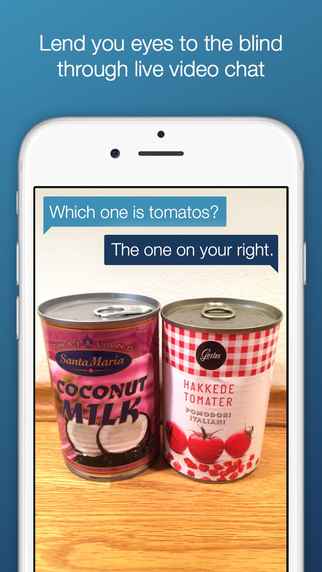
an image showing two cans - coconut milk on the left and tomatoes on the right. Blind person asks which one's the tomatoes. Sighted person's response is the right one.

We very well know that blind people are self sufficient and independent, and can go about their daily lives without much interruption. However, there are rare instances when they need assistance from someone else. 

What's the expiry date on the milk carton in my fridge? Do I have mismatched socks? Does this can have kidney beans or chick peas? Are these tomatoes or extremely ripe avocados?

It helps when someone's around but what if a blind person is by themselves?

To help blind people in such situations, a new iOS app, "Be My Eyes" lets them interact with another sighted person from anywhere in the world and ask questions similar to the ones listed above!

The concept is very simple. Blind people and sighted people register for this app. Blind people to ask questions and sighted people to answer them. Whenever a blind person has a question, they open the app and look for the first sighted person who offers to help. Sighted people, on the other hand, get notified that someone is seeking help. If someone is available to help, they accept the request. If they are not - no worries. There are tons of people out there who would grab that request. (13,000 people helpers signed up in just over a day to help 1,145 blind users). All the blind user has to do is turn on their rear camera and point it at the object they have a question about.The result: the blind user gets their question answered and everybody lives happily ever after!


It doesn't matter where they are - they  can be in one part of the world and still receive help from someone an ocean away!

The app also has a reputation system - the sighted people who are helping build a reputation based on their responses. If someone tries to be clever and gives wrong responses, they are flagged by the system and ousted within no time. So if you are trying to play a prank on a blind person - beware!

The app is free and has already received more than 2,000 requests. If you or someone you know is blind, you may want to definitely take advantage of this unique yet free app.

Download app here.
Website: Be My Eyes

Source: Engadget

Senin, 08 Desember 2014

OtoSense Mobile App: Re-Imagining Alerting Devices For Deaf, Hard Of Hearing


For Joyce Edmiston, 55, who admits she can�t hear her oven timer beeping when she removes her hearing aids, even if she�s in the kitchen, says lack of awareness of these audio alerts and other sounds can be a real problem. 

OtoSense, a sound recognition software company, has developed the first mobile app that identifies and distinguishes the source of incoming audio alerts, including alarms, sirens, timers, bells and other sounds, turning smartphones and tablets into assistive alerting devices for the deaf and hard of hearing. 

Joyce, who runs http://xpressivehandz. blogspot.com is seen here with an award.
Joyce, who runs http://xpressivehandz.
blogspot.com is seen here
with an award.
For people like Joyce and Travis Dougherty, 33, who is deaf, OtoSense offers an adaptable, affordable and useful means of being notified of important sounds in their environment.

Wherever you go, it seems, people, young and old, are using smartphones and tablets. The real value of these devices, however, comes from the mobile applications. 

Smartphones have quite literally become the new form of an assistive device - the all-in-one system that is made all that more powerful with the mobile applications available to download. Today, there are apps that let you watch (even in closed captions), text, video chat, bank, shop, read, listen, take photos and movies, check the weather, traffic and even get updated arrival and departure times during busy holiday travel season. 

Travis, who admittedly is an early adopter when it comes to new technology, says that the time has come for alerting devices to evolve and �putting this kind of technology into a smartphone and tablet just makes sense.� 

Since the birth of his daughter, Travis now wears a Pebble smartwatch, which connects to OtoSense, and he will soon connect the app to his Philips Hue Lights when the next update comes out later this month. 

Most people today have their smartphone and/or tablet within arm's reach at all times, it's the portable computer in their pocket and charging it and keeping it running is important. Certainly that�s the case for Noelle Bell, 32, who has a cochlear implant. 

OtoSense works immediately upon download, coming with a built-in library of standard fire and smoke alarm sounds found in the U.S. and Europe. Additionally, OtoSense can be personalized by users, recording and storing the most significant sounds of their environment, notifying users via flash, vibration and third-party notification including SMS text and push notification.
Noelle Bell, founder/CEO of
Buzz Worthy Social Media.
For Noelle, who pairs OtoSense with her Pebble Smartwatch, says she�s taught the app the sounds of her alarm clock, the doorbell, oven timer and dog barking. 

�It lets me know the audio cues to participate in my environment, and has helped me not feel as isolated in trying to figure out all of the different sounds of modern life,� says Noelle. �For me, the sound of the oven beeping is very similar to the sound of my doorbell, and I�ve recorded both sounds and stored them in my personal library on OtoSense. Now I can distinguish the difference between the two, and that is a real benefit.�

OtoSense is available now on the Google Play store. When the iPhone and iPad versions come out later this month, the cost of the app, on either Google Play or the App Store, will be $4.99 with some additional in-app purchases. OtoSense connects to any smartwatch, alerting user via text and vibration of a particular sound they have recorded and want to be aware of. And with the launch of the app on the App Store, users will be able to connect the app to Philips Hue Personal Wireless Lighting, customizing notifications.


According to the World Health Organization, there are 390 million people who suffer from a disabling hearing loss. In the United States, there are 48 million people who report a hearing loss according to the Hearing Loss Association of America. 

Please follow OtoSense on Twitter at www.twitter.com/otosense, like us on Facebook at www.facebook.com/otosense, and Instagram at www.instagram/otosense. If you have questions or want to sign up for our email list, please go to www.otosense.com or email us atexplorers@otosense.com.

This guest blog post was writting by Kathryn M. Quirk. Kathryn leads marketing activities for OtoSense, bringing more than 15 years of experience developing and managing multi-channel communications programs across an array of business sectors. Kathryn has insatiable thirst for news and information, reading, listening and watching everything with eye for how she can develop and share good stories, with a preference for sharing stories about how technology helps people to live more independent and autonomous lives. Always in the back in her mind, are the words of Maya Angelou, who wrote, "People will forget what you said. People will forget what you did. But people will never forget how you made them feel."
Minggu, 24 Agustus 2014

Assistive Technology Gadgets That Could Change Your Life [Infographic]

Are you or someone you know an Occupational Therapist and/or take care of someone with special needs? Michael Leavy at Home Healthcare Adaptations, a family run company has created this helpful infographic that shows some really useful assistive technology devices that can make life convenient for a lot of people. 

An electric car that people in wheelchairs maneuver  without getting off and folding the wheelchair separately? A gadget that translates head movements into computer mouse movements? Alarm clocks for the deaf? Bookmark this handy infographic for quick reference to some really cool assistive technology gadgets. (click to enlarge)

infographic titled assistive technology gadgets that could change your life
Click to enlarge

Source: Michael Leavy

Selasa, 19 Agustus 2014

A Blind Legend: Video Game For Blind People


poster of A Blind Legend showing a knight with a horse walking towards a mountain. Right below is shown a man wearing headphones and playing this game on his mobile device.

In A Blind Legend, your eyes will be of no help
So close them, sharpen your hearing and your blade�
and embark on an epic, perilous rite of passage.

For the sighted, playing a video game without any video may not make sense at all. But for the blind, it may be the next best thing since sliced bread.

The concept of "video-less" games is being adopted by more and more game developers who want to make video games accessible so that blind people could play them without any trouble. One of the games that will be coming out soon (early 2015) is "A Blind Legend" developed by Dowino studios in France after successfully completing a recent crowdfunding campaign. This is a game in which you play Edward Blake, a knight who has no eyes  and is on a mission to rescue his kidnapped wife. He is accompanied by his daughter Louise, who gives him directions and helps him navigate the environment and  fight Thork's army. There are forests, mountains, dungeons, a furious sea, lots of other obstacles and combat against numerous enemies!


Image shows various gestures used in this game.
Click to enlarge
This game does not have a video but rather a realistic, 3D sound environment which is most effective when heard using headphones. The sounds coming from different directions help you navigate and take appropriate action. A Blind Legend is very intuitive, and since it is a mobile game, there are various simple gestures that define different actions.

Dowino is aiming to offer non sighted gamers a video game that will give them a rich storyline and an immersive experience, not just a "game" that does things using audio. Once released, this game will be available free of cost for iOS and Android. A demo of the game is available on Dowino's website in English and French for both Windows and Mac. It can be downloaded from here.

To get a feel of what the sound is like, put on your headsets and listen to this clip. 


More from the developers here:


To read more about this A Blind Legend and other similar games, and to know what binaural technology is (that's used in this game), hit the source link.

Source: BBC
Websites: A Blind Legend, Dowino
Social Media: Facebook, Twitter, SoundCloud

Jumat, 07 Februari 2014

How Do Blind Users Use Smartphones?

blind user using smartphone


There are several things that are just not easy to understand if you don't have any sort of exposure to them. One of those several things that (especially sighted) people have a hard time understanding is how blind people use smartphones? A device with just a flat screen and one to maybe four physical buttons was the bane of many blind users when it first came out, but we all know that things have changed in the last so many years, and phone have become really accessible. But what does that mean (especially to sighted users who are not necessarily familiar with accessibility)? How does accessibility help blind users? What do they do different with their phones to do what sighted users would do? What kind of apps do they use on their phones?

So many questions!

Jonathan Mosen couldn't have done a better job explaining how and what for would a blind user use their smartphone. See him explain how to turn on voiceover on iDevices, and use it to navigate through apps and use them. He also enlightens us about some special apps specifically for blind users (an app that lets you take pictures of an object and searches a crowdsourced database to identify it) that make use of the smartphone a breeze and also enhance their user experience.

Last but not the least, he emphasizes how important making apps accessible is only because there are more and more blind people using smartphones now. If you are a developer, you cannot afford to ignore accessibility.

Watch this amazing video and share it! This is good knowledge for anyone and everyone!


Source: Twitter
Image source: New York Times

Minggu, 15 Desember 2013

Unus Tactus Lite And Enhancements To Full Version

Unus tactus interface shows geofencing - a radius of 1 mile set for a user.Unus Tactus interface shows pictures of contacts with help button


A while ago I wrote about this wonderful yet simple app called Unus Tactus that provides an easy interface for people with motor/ cognitive deficits to make phone calls and notifies their emergency contacts if they get disoriented or lost and exit the "fence" (a radius in miles that has been set for them that's considered safe) . Recently, Unus Tactus released the lite version of the app that lets you try and test it before you buy the full version for $9.99. The lite version lets you add just one contact and does not have "geofencing" capabilities.

In the full version of the app, some features have been added and refined, like:
  •     Easy set up and editing of an unlimited number of photo/phone contacts.
  •     Alphabetizing of contacts with picture and name display of every contact.
  •     Customizable emergency contact e-mail and phone number.
  •     Emergency button for fast help with a Google maps link to ID phone caller location.
  •     E-mails with a map link location sent to the emergency contact after every outgoing call
  •     �Geo-fence� feature with 5 different distance settings up to 15 miles.
  •     Automatic e-mail with Google Map and, iCloud link if phone exits geo-fence area with out call being made. (All E-mail notifications are On/Off switch able).
Check out this video to see how easily the app can be set up. 


The lite version can be downloaded here, and the full version here.

To read the full press release that has more details on the app and new enhanced features, go here.

Unus Tactus website: www.unustactus.com 


Minggu, 25 Agustus 2013

CanTunes And CanPlan: iOS Apps For Cognitive Impairment

There are certain simple interests we all have that bring us immense pleasure. Needless to say, one of them is listening to music. Thanks to digital music and portable music devices, listening to music is much more fun, and the experience is more special. But what if someone has cognitive impairment and finds maneuvering regular music applications like iTunes difficult?

CanAssist, an assistive technology organization, has released an app for iOS with a minimal interface that helps people with cognitive disabilities play music on their iPhones and iPads with utmost east. CanTunes, a $.99 app on the app store, does not require knowledge of traditional music player buttons (play, pause, rewind, forward, etc.). The interface displays all the album covers on the device in the form of a circular disc. Tapping the album cover starts playing the music and spins the album art continuously, indicating that it is playing. Tapping the  same album art stops the music. You can also tap a different album cover to play that album and stop the current one. As simple as that!

CanTunes interface displaying four album arts

This app also has sleep mode to turn off music after a certain period of time, and is also compatible with VoiceOver.

The same organization has developed another useful app called CanPlan which is a task management app that helps people with a range of cognitive challenges to complete activities with greater independence and confidence.

To set things up, a user would work with a support person and take pictures of each step in a task. For example, for all the steps required to make coffee (get coffee grinds, get filter, etc.), they can take pictures of every step, caption them and create a task. Whenever the user needs to perform that task, they will just go through all the steps one by one in CanPlan and finish that task. These tasks can also be scheduled - they can set reminders for themselves, so at a certain time of day, a message will alert them to perform that task, and they can go through all the steps one by one to accomplish it.

Watch this video for a simple demo of this app.


The free version of CanPlan supports a maximum of 3 tasks. The full version, which supports an unlimited number of tasks, is available for purchase from within the free app.

Minggu, 14 Juli 2013

Glove That Helps Deaf-Blind People Communicate

Image Source: The Atlantic

Tom Beiling, a 32 year old doctoral candidate in Berlin, has come up with a glove that just might revolutionize the way deaf-blind people communicate, at least in the form of texting. 

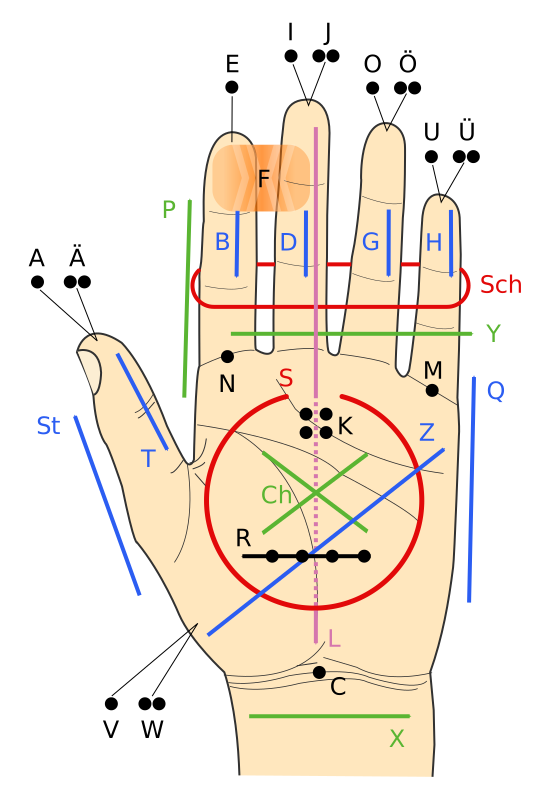
Image showing Lorm alphabetWith the intention of making communication easier between people who cannot see and hear, Tom has developed a glove that translates texts into pulses (haptic feedback). The glove consists of a set of pressure sensors, and with the help of a bluetooth device, connects to an iPhone app. The glove uses the Lorm alphabet (which places letters at different parts of  the hand (see image)), and a pressure sensor is placed at the locations that are meant for letters (for example, fingertips are meant for vowels). 

When someone needs to send text, the user just pushes the sensors meant for the alphabets that comprise of the words that they are wanting to send, and the haptic information from the tapping is converted to digital text and sent to the iphone app that sends out the message to the intended recipient. When the recipient receives the text, the motors on their glove vibrate and translate the words into vibrations, and they feel the vibrations on the pressure sensors. The vibrations essentially spell the words out. 

One advantage of using this glove to communicate is that you don't have to know Lorm alphabet to communicate  with  someone who is deaf-blind - the app converts digital text to Lorm alphabet for them. Till now, one had to know Lorm alphabet in order to communicate with people with deafblindness. 


The glove is still a prototype. Beiling's next prototype would probably be made out of material that is thinner than the one used for the current prototype.

Source: The Atlantic

Minggu, 12 Mei 2013

I-Limb Ultra: Prosthetic Hand Controlled By iPhone App


picture of patrick kane holding an object with i-limb

Someone once sad �there�s an app for that,� and they weren�t wrong! In today�s society, everyday life is being made easier by apps on smart phones which can do anything from letting us check our bank balance on the move to helping us avoid the traffic on the school run. But the category that has shown the biggest boom in downloads are the medical apps. These range from apps that can help patients to control their long term illnesses, to apps that can allow doctors to visualise their patient�s x-ray radiographs on the move. 

picture of i-limb's iphone appOne app that has made a big difference to patient�s lives is the iBGStar Diabetes Manager, and other
apps like it. They are used by diabetic patients to measure their blood sugar levels and keep track of previous reading to ensure they have good control over their condition. This is not only easier for the patient than the old �diary� method of recording their blood sugars, but it can help their doctors to see how treatment is working for their patient and whether it needs to be changed.

picture of patrick kane holding an object with i-limbThe award for the most innovative and life changing app must go to the i-Limb Ultra from Touch Bionics: the app is connected to a bionic prosthetic hand via Bluetooth and users can select different �grips� for any specific tasks they need to do. Sounds like something out of a movie, right? That�s what 16 year old Patrick Kane thought when he was fitted with the bionic hand. He lost his
hand as a baby due to meningococcal septicaemia, but because of this revolutionary new device he is able to live a normal life again, something that we often take for granted. The hand allows Patrick to carry out movements that are so precise they have not been possible with a normal prosthetic in the past: he can now hold a glass, pick up a piece of paper and tie his shoelaces with the touch of a button on his iPhone.

diagram showing how the i-limb works


picture of i-limb's iphone appThe limb can be controlled by electrical signals in muscles as well as by the iPhone, but this does take some practice to master as Patrick has already learned: "Controlling the hand feels very natural, although it does take a bit longer to learn how to use the automatic grips and gestures, so it was very useful to be able to work with the Touch Bionics therapist on these skills."

This innovation is a huge step for people like Patrick. At the moment the limb is still very expensive, between �30,000 and �80,000, but this technology means that in the not so distant future people that have lost a limb will be able to have the same quality of life as those who haven�t been so unlucky.


This article was written by Niqui Stubbs, a 4th year medical student with a love of gadgets and technology. She has worked with people who have lost a limb and knows the huge impact a bionic limb like this can have on someone�s life.

Senin, 05 Maret 2012

Unus Tactus - Easy iPhone Interface For People With Motor/ Cognitive Deficits

Unus Tactus is a new iOS app that is designed to simplify the lives of people with mild cognitive and/ or motor deficits. The app creates an easy to use phone interface and adds quite many important features that can be easily used for making calls and in case of an emergency.

Unus Tactus creates an interface that shows all contacts in the phone in a 4x4 grid. Each grid has a contact's name and a big thumbnail of them. Calling them simply requires a tap on the thumbnail.


Another useful feature is the big help button on the app, which is available all the time. Whenever  the help button is pressed, two things happen: a phone call is made to an emergency contact, and at the same time a link is emailed to the emergency contact showing the person's exact location on Google Maps. 

The app also has a very interesting feature called Geofence which keeps track of the phone owner's physical location. If the person exits the "fence" (which can be set on the phone - 1 to 15 miles radius), an email with a link to that person's exact location on Google Maps, and an iCloud link (for tracking in real time if the emergency contact knows the phone owner's iCloud login) is sent to the emergency contact. 

Both these features can be especially helpful to people who suffer from Dementia, Parkinson's, Alzheimer's, or any other disease that affects judgement, cognition etc.


The idea behind the app is to give peace of mind to caregivers, and to assure them that their loved ones are safe. Although this app is meant for people with cognitive deficits, I see this app as a very useful tool for even people with visual impairment who may use the help button if they get lost during their daily travels, or exit their "geofence". People with low vision too may find the big thumbnails very helpful for making calls.

Currently, this app is only available for iOS (4.2 and above) for $9.99. Go to the Apple app store to buy this app.

To visit the developer's website, click here. The developer also has a Facebook page (Unus Tactus) and a twitter handle (@unustactus).

Rabu, 21 September 2011

FotoBabble: Add Voice To Your Photos

Sharing your photos with people with visual impairment just got a lot more easier and fun. Well, visual impairment may not allow them to see your pictures, but they would still love to hear  about your experiences, right? But what if they are far away from you - a couple of states, maybe an ocean away? That's when FotoBabble comes into the picture. FotoBabble is a web/mobile service that lets you add voice to your pictures. You can sign up for this service (it's free) and use either their website or iPhone app to create pictures with audio descriptions. You can either upload your own picture or choose one from Facebook, and add an audio description (maximum 60 seconds) to it.

Here is picture from FotoBabble with a very good audio description of the picture (click the play button at the bottom left corner of the picture to hear the audio).


Here is a quick tutorial on how to add audio to a picture using FotoBabble.


Website: www.FotoBabble.com
iPhone app (free): iTunes Store

Source: Mashable

Senin, 19 September 2011

Audiobooks: Audiobook App for iOS

Audiobooks is very true to its name, and if you like (free) audiobooks, then this is the app for you. Available for both iPhone/iPod Touch and iPad, Audiobooks has over 3,500 classic books available for free. Most of the books come from the LibriVox Project where people from around the world release classic audiobooks that they themselves recorded.

Audiobooks is very intuitive  and easy to use. The first option on the app on the left navigation bar is "Top 50" from where you can choose one of the most popular classic books. You can also search for a book using the search option on the top left corner.


Notice that some of the books are highlighted in green and some in grey. The ones in grey are totally free whereas the ones in green have both free and paid options.


If you choose a book highlighted in green you will get multiple versions of it. The first version is always the paid version. 

There is also an "All A - Z" option that lists all the books this app has. Here, the ones highlighted in grey have both free and paid versions, however, the ones in blue are paid only. There are no free versions of those books available.


This app has a rating of 3/5 on iTunes. I noticed that most of the critical reviewers were looking for modern day books on this app which they obviously did not find. After reading those comments, I think I should mention here again that this app only has classic books. I tried three audiobooks and did not have any problems going through them (not the entire lengths, just bits and pieces for the sake of this blog post). 

The ad supported app is available for free. If you don't want to see ads and access some more features, you can get the app for $.99.

Rabu, 13 Juli 2011

CATRA - Smartphone Accessory That Detects Cataract

woman using catra accessory with a smart phone.


CATRA is a highly portable, and easy to use accessory that attaches itself to a smart phone and easily detects cataract. Made from off the shelf components, and consisting of no moving parts, CATRA, developed by Ramesh Raskar's team at MIT, is being considered to be ideal for the developing world.

The user is made to look through the accessory and press a few buttons. Doing so allows the app to collect quantifiable data and create an attenuation map, which in turn helps detect cataracts.

Watch this (technical) video to know more about CATRA.


Note: Although the price of the accessory is not mentioned anywhere, the same team designed a similar accessory called NETRA for eye exams which costs $1.

For more technical details, and to read the paper, hit the source link.
Source: MIT

Minggu, 19 Juni 2011

Netflix Adds Captioning to iOS

Netflix recently announced that it has added captioning capabilities to its iOS apps on iPhone/ iPod Touch/ iPad. Turning on captioning is very easy. If captioning is available for a movie/ show you are watching, a little balloon appears right on top of the "controls bar" (where the volume bar, pause button are displayed). Clicking the little balloon brings up a list of languages in which captions are available (currently English). Choosing a language starts the captions.

netflix screenshot showing balloon that shows list of languages in which captioning is available.
Click the little balloon to see a  list of languages

netflix screenshot showing list of languages in which captioning is available
Choose language

netflix screenshot showing captions in english
Captions now turned on

Sabtu, 09 April 2011

ZoomReader - Speech to Text App for iPhone/iOS

Ai Squared has created a new app for the iPhone and iPod Touch (soon iPad 2) that not only zooms text for visually impaired people but also reads the text back to them.

So what's so special about this app? It sounds like just another text to speech app, doesn't it?

ZoomReader is meant not only for text in documents but pretty much any text - even on boxes, bottles, or any object you can think of that has some text on it. The concept behind the app is very simple - The user takes a picture of the text on an object/ document with their iPhone camera. The app then converts the picture digitally into text using OCR, and reads the text out loud to the user. The app automatically focusses the camera before taking a picture. However, the user can manually focus the camera too by tapping the screen in the center. The app also does a digital zoom on the object so that users could just read enlarged text without going through the OCR process.

Ai Squared claims that this app can have 98% accuracy if the phone is used with a "clamp stand" so that the camera does not shake while taking pictures (perhaps like this one?).

This app is available in the iTunes App Store for $19.99 for the iPhone and iPod Touch, and will soon be available for the iPad 2 (this app is compatible with iOS 4.2+ only). There is no news on when Android users would get this app.

Please watch this video to see ZoomReader in action.


Source: WSJ Blog

Rabu, 09 Maret 2011

Money Reader iOS App For Blind And Visually Impaired (Video)

Looktel's Money Reader is a revolutionary augmented reality app for the iPhone, iPod Touch (with camera) and iPad (with camera) for the visually impaired that counts US dollar bills ($1, $2, $5, $10, $20, $50, and $100 bills). As soon as the app detects the bills, it starts counting. There is no need to place the bills in front of the phone camera in a certain orientation. The app detects the bill artwork and immediately recognizes the denomination.

Money Reader does not require an internet connection which makes it usable everywhere. This app is available for $1.99 (app description here).

A quick note about iPhone 3GS and iPod Touch fourth generation (from Money Reader's description on iTunes):

"Note: If you are using an iPhone 3GS or 4th Generation iPod, LookTel Money Reader requires an environment with plenty of light."

Check out the video for a very impressive demo!


Source: Looktel via Engadget

Rabu, 16 Februari 2011

ASL videos from IRS With Captioning

The IRS has a number of videos on Youtube that are very informative and beneficial for people who have low/ no vision, or hearing impairment. The videos feature IRS employees who are using ASL to provide information on tax filing, software for filing taxes, and other useful tips for tax payers, business owners, and leaders of non exempt organizations. All these videos have captions in English as well.

One very important piece of information they provide through one of these videos is that taxpayers can do their federal tax returns for free using tax software provided by companies in the Free File Alliance. Taxpayers in AL, AZ, AR, GA, ID, IA, KY, MI, MN, MO, MS, NY, ND, NC, OK, OR, RI, SC, VT, VA, WV can file their state tax returns for free as well. (Source).

If taxpayers do not have access to a computer, they can call 1- 800-829-1040 through relay service to get assistance with tax filing. For face to face assistance, taxpayers can contact their local IRS office (more info here).

Here is a video with some tips on what taxpayers should do if they do not receive their W2.


Here's another video that has information on IRS's iPhone and Android app (IRS2Go) to check refund status, and get other useful tax information.


To see all the IRS ASL videos with captions, please go to their Youtube channel here.

Source (@mpaciello)

Kamis, 27 Januari 2011

Text to Speech App for iPhone/iPod/iPad

Here's a great app for the iPhone/iPod/iPad that lets people with speech impairment to communicate very easily and efficiently with others. It is called Assistive Chat, and the strong point of this app is predictive text. Once the user types a letter, Assistive Chat gives them a list of six words. They can either choose one of the six words or type the next letter to get more suggested words. Once the needed word appears in the list, the user simply selects it, and that word becomes a part of the sentence. Once the entire sentence has been typed, a "speech" button read it out loud.

The idea behind this app is to have a decent conversation without involving too many keystrokes because that can be somewhat time consuming, and tiring.

Watch the video to see a demo of Assistive Chat.


The creators of this app advice people with disabilities to use it on the iPad because of its bigger screen surface. It sells on the app store for $24.99.
Mas Kur. Diberdayakan oleh Blogger.

 
biz.