Tampilkan postingan dengan label motor skills. Tampilkan semua postingan

Kamis, 04 Desember 2014

Ubi: A Voice Controlled Device That Converts Speech To Actions

photo of ubi on a side table by a couch


There is a device in the market that just might be the ultimate device for anyone with limited mobility and/or vision impairment - a device that just sits around and does pretty much anything you want.

Say  hello to the Ubi!

The Ubi is a hands-free, voice operated device that connects to the wifi and converts commands in natural speech to remarkable actions. It can pick up your voice from up to 8 feet, and can be used to do several things like sending text messages and emails to contacts, listening to music (free music streaming service), looking up information on the internet, controlling your home thermostat, controlling lighting in your house, locking doors, making announcements to family ("come down, kids! Dinner's ready."), setting reminders for yourself, getting important updates and alerts, controlling other internet connected devices...the options are endless! All one has to do is say "OK Ubi.." and say what they desire!

It's an amazing device for someone who may have bad motor skills, limited mobility, or vision impairment - it makes communication extremely easy for them and alleviates their dependence on others.

Be sure to check out their blog too. They post about all the amazing things Ubi can do.

The Ubi is priced at $299 and can be ordered directly from its website.

Watch the following video to see the Ubi in action!


Website: http://www.theubi.com


Minggu, 12 Oktober 2014

Prosthetic Hand Lets Amputees Feel Texture Of Objects

an amputee wearing a prosthetic hand and gripping a cherry tomato
Over the years, prosthetic hands are becoming more and more viable for people who lose their hands in accidents or were perhaps not born with one. Prosthetic limbs are great in that they help the users get back to daily routine operations. The one thing that most prosthetic limbs don't do however, is allow the wearer to feel the texture of objects that they grip. Scientists at Case Western Reserve University in Cleveland, OH have taken the prosthetic hand one step ahead by adding sensation and "feel" to the hand they have created. 

"Touch perception on the fingers and hand is essential for fine motor control, contributes to our sense of self, allows for effective communication, and aids in our fundamental perception of the world." [1]

Turns out, sensation is not felt or generated by a hand but by a certain part of the brain. When a person lose their hand, they inherently lose the input that switches on those parts of the brain responsible for sensation. By sending electric signals by a computer into nerves in the user's arm and eventually to a specific part of the brain, sensation or touch can be reactivated.

Igor Spetic, a man who lost his right hand in an industrial accident in 2005, says that he can see his arm hair raise when a cotton is brushed against his prosthetic hand.

another amputee wearing the prosthetic hand squeezing toothpaste on a toothbrushSince the amputees can now feel the texture of the object they are handling, they also know exactly how much pressure to apply to form their grip without damaging the object. With other prosthetic hands, gripping tomatoes and grapes meant creating juice instantly!

Currently, this arm can be tested and improved only in a lab setting, however, the team plans to create an implantable hand in the next five years so it could be tested at home. Detailed description of how this hand works was published in this article.

Watch the video to learn about all the research that has been going on to make this hand a success.


Source: CWRU via Gizmodo, Science Translational Medicine [1] 

Jumat, 11 Juli 2014

Parrot Speak To Call: Hands Free Phone Software

Parraot speak to call logo

As we saw in the last post, spinal cord injuries or paralysis can render arms unusable. Anyone with not so good motor skills also have difficulty using their fingers and hands to perform daily operations, thus making them depend on others around them to get things done. One of those things can be getting help to make and receive phone calls - a process that seems fairly simple, but without the use of arms, can be quite a bit of a challenge. It is quite possible that someone may not be around all the time, and waiting for a friend or caregiver to come check in on them may be the only option for quite many people.

To alleviate this problem, Parrot "Speak to Call" provides a very convenient solution. A software that runs on Windows PC along with Dragon Naturally Speaking and Microsoft Speech (comes with Windows), Parrot helps make and receive phone calls by just using speech. The interface is very simple and minimal with just the essential options displayed. The software comes with a few "lists" of its own (Family, Friends, Professionals & Businesses and Work), to which you can add contact information and their phone numbers. Of course, it gives you the ability to add more lists too if the four it comes with are not enough. With just one word commands, Parrot can make making and receiving phone calls a breeze. Check out the quick videos below to see Parrot "Speak to Call" in action.


Set up is very simple (make sure you know how to enable your speech recognition software). The best part is that you don't require a phone line or need to hook it up to your existing phone line. It works on its own and does not depend on any other hardware accessories (except the USB headset you will be using to make calls) which typically complicate set up and use, and make things difficult to fix if they break. When you sign up, they give you a phone number as well.

A very good solution for people who don't have good motor skills or cannot use their arms because of paralysis or other spinal cord injuries. This software can also be used by bedridden people or  those who cannot move a lot because of sickness or old age to call their caregiver to let them know if they need anything.

Signing up requires a one time fee of $99 and a monthly $39 fee for unlimited calling within USA and Canada (month to month; no contract). $10 from each sale also goes to charity!

Go to Parrot's website to learn more about this product.


Website: www.speaktocall.com

Selasa, 08 Juli 2014

Neurobridge: Technology That Helps Paralyzed People Move Limbs With Their Thought

Ivan using Neurobridge technology to move his arm with his thought

Spinal cord injuries/ paralysis are fatal because they cut off communication between the brain and limbs - damaged nerves are unable to transfer signals from the brain to limbs, thus rendering them unusable. However, just recently, a team of scientists from Ohio State University and Battelle partnered together to use a breakthrough technology called Neurobridge (created by Battelle) that helps quadriplegics move their limbs with just their thought!

Ivan seen using Neurobridge technologyAs mentioned earlier, nerves are crucial for limb movement, and fatal accidents that cause injuries to the
spine and damage nerves drastically impact limb movement. This is where Neurobridge comes to rescue. A little chip (smaller than a pea) is implanted in the part of the brain that controls arm and hand movements. This chip reads and interprets brain signals, sends them to a computer that recodes and sends them to a sleeve that the patient is wearing, and simulates the proper muscles, thus allowing them to move the desired limb. It takes a total of one tenth of a second from thought to limb movement. So essentially, it totally bypasses the (damaged) nerves responsible for transmitting signals from the brain to the limb and sends them directly to the muscles instead.

Watch this video to see Ivan Burkhart, a 23 year old quadriplegic who was paralyzed after a diving accident move his arm by using Neurobridge.


This is still a clinical study (FDA approved) that is working with five patients. Currently, the study is focussing on arms and hands, but the possibilities in the future are endless. To begin with, brushing their teeth, flossing, using their own hands to eat with a spoon or fork etc. can be a huge boost to a paralyzed person's morale and confidence.

What the scientists have achieved so far is a big step forward, and they are only going to continue to make such advancements in the future. 

Watch the video to learn more about paralysis and how this technology works. Hit the source links for more details.


Minggu, 06 April 2014

Cyabathlon: Sporting Event For People With Disabilities

There is a lot going on in the assistive technology world - newer and exciting advancements are happening all the time. However, the purpose of assistive technology is not just to provide suitable accommodations and make life easier for people with disabilities but also to take things to the next level - make them competitive; help them become true sportsmen.

To bring that philosophy to reality, Cybathlon, a championship for people with disabilities, will take place in Zurich on 8 October 2016. The event is open to everyone who wear prosthetic limbs; use exoskeletons, powered wheelchairs or brain interfaces. The people competing can either use commercially available products or prototypes made by individuals or research labs. There would be two medals for each event - one for the "pilot" (the person driving or using the device) and the other for the manufacturer of said device.


 Pilots will be participating in the following disciplines:
  • Arm Prosthetic Race: Amputees wearing prosthetic upper arm limbs will be required to complete two hand tasks as quickly as possible.
  • Brain Computer Interface Race: Pilots will wear a brain interface that will be used to control their avatar in a horse race or car race game.
  • FES Bike Race: Pilots with complete spinal cord injuries will be given Functional Electrical Simulation devices which will enable them to pedal on a circular track.
  • Leg Prosthetics Race: Pilots with lower limb prosthetics will be competing in a race with tasks and hurdles.
  • Powered Exoskeleton Race: Pilots wearing exoskeleton will be walking in a circuit with various tasks, elements and hurdles.
  • Powered Wheelchair Race: Similar to the Exoskeleton Race, pilots who are on powered wheelchair will be steering their wheelchairs along a particular course with various obstacles.


As an example, here is what the Leg Prosthetic Race circuit looks like (click to enlarge):

diagram showing leg prosthetic race circuit with its elements and hurdles


The Cybathlon is not just for promoting competitiveness among people with disabilities - there are some very noble aspirations attached to it. First and foremost, to keep encouraging companies and research labs to produce cutting edge assistive technology devices. Second, to make the common public aware of all the challenges and opportunities that assistive technology provides, and last, but not the least, to enable pilots to compete in various races!

This is a unique way to bring excitement into the assistive technology world and to everyone involved in this area. Keep an eye on this event. I will post again about Cybathlon as more information becomes available!

Website: Cybathlon

Kamis, 13 Maret 2014

Disability Hacker: A Great Blog For Hacks Around The House For Disabled People

Banner stating outta the box thinking with disability hacker

We depend so much on technology these days that more often than not, we sideline some of the most basic and trivial things and concepts that can be extremely beneficial in performing day to day activities. We are constantly looking at the next cutting edge technology that is going to revolutionize the assistive technology world, but how often do we scrutinize the very ordinary and simple things around us that can make everything easy and wonderful?

I recently stumbled across a blog that does just that - instead of focussing on top of the line technological marvels, it looks at the simplest of items around us that prove to be, well, magical of sorts. If you go to Disability Hacker, you will find all sorts of workarounds, gadgets, ideas that are either readily available or can be easily brought to life ("hacked"). From single handed soap dispensers to knives (helpful for amputees), from cracking an egg single handedly using a special (readily available on Amazon!) gadget to chopping vegetables, this blog is full of ideas and mechanisms that will help anyone with not so good motor skills to perform daily activities without trouble. Has taking care of a pet always been a challenge because of your disability? They have tips on how to take best care of your pet - what items to buy and where that doesn't involve a lot of physical work. For someone who has mobility issues, going around the house and turning off all the lights around the house can be quite a cumbersome process. Did you know you could connect your lights to remote controlled sockets and turn them off all at once while relaxing in your favorite chair? Don't thank me, thank the Disability Hacker! 

I am glad blogs like Disability Hacker exist. What I realized after reading that blog is simplicity is everywhere, and provides a great deal of convenience and comfort. All we have to do is look for it and appreciate it!

Head to the Disability Hacker to know more about hacks around the house! On Twitter , they are @hackdisability.


Senin, 27 Januari 2014

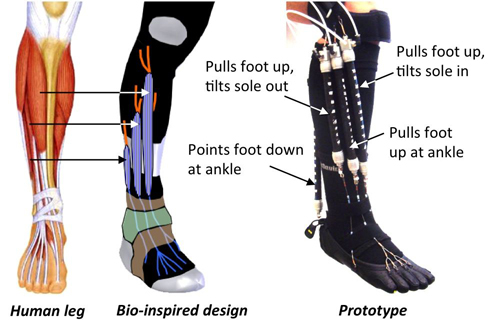
Robotic Device That Mimics Human Leg Could Help With Rehabilitation

diagram explaining how this device mimics the biological leg


Yong-Lae Park, an assistant professor at Carnegie Mellon University, has developed a device made of soft, wearable material that could help in the rehabilitation of patients with neuromuscular disorders associated with cerebral palsy, amyotrophic lateral sclerosis (als), multiple sclerosis or stroke, and ankle-foot disorders like drop foot.

This device, composed of soft plastics and composite materials, mimics the muscles and ligaments of the human leg, and is not rigid like an exoskeleton because of which it has the ability to incorporate lightweight sensors and ultimately achieve natural motion by mimicking the biological structure of the lower leg. This device's composition allows the wearer to achieve a normal walking gait (moving the foot side to side at 27 degrees).

Park says that this device can be modified to create rehabilitation devices for other parts of the body too. The next steps with this device are to determine its performance as a rehabilitation tool and also to use much lighter material to form the "muscles" of the leg.

Here is a quick demo of this device.


Source: Carnegie Mellon via Gizmodo

Senin, 30 Desember 2013

PointGrab: Control Household Appliances And Electronic Devices With Point And Gesture Control

a user pointing finger and eyes at computer screen to perform action


We have been seeing a lot of devices that are touch and gesture enabled that can be very helpful for people with various disabilities (motor skills, spinal injuries, quadriplegics). However, all the devices that we have seen so far work with computers.

That is soon going to change.

A Tel Aviv based company, PointGrab, is working on bringing to the masses a couple of concepts that use motion and gesture controls not just with computers but also with household appliances! The technology works by creating a "transparent space" in front of the user, enabling a touch interface but from a distance. The user has to be pointing their eyes and a finger at the device and perform a gesture to get the desired action. For example, pointing a finger at a lamp will turn it on, and moving it in a downward motion will dim the lamp. Similar gestures can be used to control any device in the house - air conditioners, window shades, thermostats, doors, etc. PointSwitch is the concept that works with appliances, and AirTouch works with computers, televisions, and other consumer devices.

The company suggests that we should start seeing these technologies in consumer products as soon as early 2014.

Watch the following two videos to see how PointSwitch and AirTouch work.


Source: Engadget
Image Source: Engadget

Website: PointGrab

Selasa, 24 Desember 2013

Tongue Driving System: Tongue Controlled Wheelchair For Quadriplegics


picture of headset, piercing and app for TDS


Professor Maysam Ghovanloo at Georgia Tech has been working hard since 2005 on a system that lets a user control their wheelchair with their tongue. Tongue! His research has borne fruit, and the results are pretty incredible.

This system is most beneficial for people who have high level spinal cord injuries or are quadriplegic.

This is how it works: The user has a magnet placed inside their tongue in the form of a piercing. The
the phone interface for TDS user also wears a headset which actually detects the location of the magnet as the tongue moves. The location is grabbed and wirelessly communicated to an app installed on the user's phone which in turn sends it to the wheelchair and the command is finally executed.

This method is found to be three times faster than the traditional sip and puff method.  Not only can it be used to just maneuver a wheelchair, but to play video games and use computers or phones too. 11 volunteers helped with the testing and it was found that their performance significantly improved between training session one and two, suggesting how easy it is to use.

The idea behind the study was not just to see how accurate and fast TDS (Tongue Driving System) is but also to prove to insurance companies that tongue control is indeed useful.

The next step in this research is to enhance the TDS by getting rid of the headset.

Watch this video to learn more about what professor Ghovanloo has to say about TDS.


Go here if you are interested in reading the published paper.

Source: The Verge

Kamis, 25 Juli 2013

DexType: Virtual Keyboard For Leap Motion Controller

DexType app screenshot


Leap Motion controller, that allows you to control your computer by using gestures (sometimes just a flick of a finger is enough), was made available to the public on Monday. Of the very few apps that are available in the Leap Motion, one that truly stands out, and is extremely useful for people with impaired motor skills (whose skills may not be strong enough to use a physical keyboard) is an app called DexType.

DexType is a virtual keyboard that lets you type by just using gestures in the air. To type, the user just "bounces" from one key to another. The keys are aligned in a line at the bottom of the screen, and the user can switch to one of many keyboard formats with QWERTY, of course, being one of them. The beauty of DexType is that typing can be achieved by using only two fingers one one hand. Using just one hand for typing would be beneficial for people who may have only one hand functional and/or one of their hands is paralyzed.

DexType also comes with tools that help users navigate the web without the use of a keyboard and mouse. Going to any website, composing and sending emails, following links and doing every task that you would typically do on the web is a breeze with DexType.

Here is a quick demo of DexType in action.


This app is available for Google chrome here for free till August 7. After that, the free version will be ad supported and a premium ad free version will be available for $4.99.

Read the following press release for more detailed and specific information about DexType.

PRESS RELEASE

On Monday, the LEAP Motion gesture recognition device finally became available to everyone.  The first generation of software for the LEAP includes some incredible programs, but we believe that gesture recognition can be used for so much more than just playing games.  We're proud to announce the release of DexType, which changes the LEAP from an entertaining gadget into a genuinely useful tool by providing an alternative to the most important peripheral device of all - the keyboard.

DexType is the world's first truly "virtual" keyboard, a system that allows users to type using nothing more than gestures in the air.  The keys are arranged at the bottom of the screen in a single line.  The sequence of letters is a linear arrangement of the familiar QWERTY keyboard.*  To type, the user simply bounces from key to key.

DexType gives you a lot of leeway to be imprecise with your keystrokes.  It treats keystrokes as groups instead of as discrete letters, and processes input with a disambiguation algorithm to predict the intended output.  This means that even with gibberish input, such as "nxopl", the system will still produce a word - "hello".  The most likely output is predicted based on the available possibilities, and if necessary the user can select from other options with a simple swiping gesture.

If definitive keystrokes are required (such as for acronyms, usernames, or passwords), they are easily available by simply pressing deeper.  Numbers and symbols are accesible through a separate layout, but can also be produced via handwriting recognition.  Punctuation can be produced via chords - pressing two keys at the same time in specific regions.  Editing is possible using simple gestures - a sideways swipe allows the user to erase single letters or entire words, depending on the length of the motion.

DexType includes a tool set that gives you all the options you need to navigate the web without having to use a keyboard or a mouse.  You can scroll and click within pages, and most importantly, you can type.  You can follow links, launch a search engine, or navigate directly to literally anywhere on the web.  You can compose emails and documents, or fill in forms.  You can move backward or forward in your browser history; you can open new tabs, close existing ones, or browse through them all.

With DexType, it becomes possible to use a computer without having to touch anything at all.  Pastry chefs can look up recipes while their hands are covered in flour.  Neurosurgeons can add notes to a brainscan without having to touch an unsterilized surface.  And everyone else can lounge on the couch and select a movie to watch while munching on buttered popcorn.

DexType is currently available for download via the Chrome Web Store (see link below).  The software is absolutely free until August 7, at which point the free version will become ad-supported and a premium version will be available for $4.99.

DexType will also be available for cellphones and tablets.  In late August, we intend to have a beta version available for Android users to download and try.  Users who purchase the premium version of DexType will receive automatic access to the Android version, and the beta version will be available to other users as well for a minimal cost.

For additional information, please contact:

Zack Dennis
Pointesa, LLC
E-mail: zack@dextype.com

Phone: 323-877-6918

Minggu, 12 Mei 2013

I-Limb Ultra: Prosthetic Hand Controlled By iPhone App


picture of patrick kane holding an object with i-limb

Someone once sad �there�s an app for that,� and they weren�t wrong! In today�s society, everyday life is being made easier by apps on smart phones which can do anything from letting us check our bank balance on the move to helping us avoid the traffic on the school run. But the category that has shown the biggest boom in downloads are the medical apps. These range from apps that can help patients to control their long term illnesses, to apps that can allow doctors to visualise their patient�s x-ray radiographs on the move. 

picture of i-limb's iphone appOne app that has made a big difference to patient�s lives is the iBGStar Diabetes Manager, and other
apps like it. They are used by diabetic patients to measure their blood sugar levels and keep track of previous reading to ensure they have good control over their condition. This is not only easier for the patient than the old �diary� method of recording their blood sugars, but it can help their doctors to see how treatment is working for their patient and whether it needs to be changed.

picture of patrick kane holding an object with i-limbThe award for the most innovative and life changing app must go to the i-Limb Ultra from Touch Bionics: the app is connected to a bionic prosthetic hand via Bluetooth and users can select different �grips� for any specific tasks they need to do. Sounds like something out of a movie, right? That�s what 16 year old Patrick Kane thought when he was fitted with the bionic hand. He lost his
hand as a baby due to meningococcal septicaemia, but because of this revolutionary new device he is able to live a normal life again, something that we often take for granted. The hand allows Patrick to carry out movements that are so precise they have not been possible with a normal prosthetic in the past: he can now hold a glass, pick up a piece of paper and tie his shoelaces with the touch of a button on his iPhone.

diagram showing how the i-limb works


picture of i-limb's iphone appThe limb can be controlled by electrical signals in muscles as well as by the iPhone, but this does take some practice to master as Patrick has already learned: "Controlling the hand feels very natural, although it does take a bit longer to learn how to use the automatic grips and gestures, so it was very useful to be able to work with the Touch Bionics therapist on these skills."

This innovation is a huge step for people like Patrick. At the moment the limb is still very expensive, between �30,000 and �80,000, but this technology means that in the not so distant future people that have lost a limb will be able to have the same quality of life as those who haven�t been so unlucky.


This article was written by Niqui Stubbs, a 4th year medical student with a love of gadgets and technology. She has worked with people who have lost a limb and knows the huge impact a bionic limb like this can have on someone�s life.

Kamis, 21 Maret 2013

Bebionic3: Prosthetic Arm For Daily Use

In the last year or so, we have seen quite a few prosthetic limbs in the market that are just remarkable in their own way - from helping people pick up things to offering touch and feel. Rapid developments in this area only go to show that people are actually accepting prosthetic limbs as a good substitute for a real limb.

Nigel Ackland, who lost his arm in an accident six years ago, was fitted with the Bebionic3 just last November, and already he can use the arm so seamlessly and flawlessly to perform daily chores - from tying shoelaces to making an omelette.

silicone skin for the bebionic3 armI think the Bebionic3 is the only prosthetic arm (as far as I know) that comes with its own silicone skin to give it a natural appearance. The hand also comes with its own software that can be monitored and configured wirelessly. Make sure to check out the website (source link) to learn (a lot) more about the gripping mechanisms, components it is made of, and all the technical information.

Nigel Ackland, everyone.


Source: Bebionic.com via Gizmodo

Rabu, 13 Maret 2013

Hodu: A "Zero Failure" Physical Therapy Device

Traditional physical therapy devices require a lot of effort even when a patient is just starting with their therapy, only to get discouraged and disappointed sooner or later and giving up. Hodu, however, is a simple "zero failure" physical therapy device that rewards the patient for even the slightest of effort applied, thus encouraging them to keep going and getting better and stronger. The device has built in sensors that detects the effort/pressure being applied and lights up colored LEDs. Every color is associated with a certain level of pressure applied on the device.

diagram showing sensors and led placement on hodu

The team behind Hodu is also working on software that will record the patient's progress and email all the information to their therapist.

A very simple, yet useful device. Check out the video to see what Hodu is capable of!


Source: Engadget, Meatbotics
Image source: Engadget

Selasa, 26 Februari 2013

Bionic Hand That Offers Touch And Feel Real Time

An amputee testing the bionic hand

The last few years have seen a tremendous amount of progress when it comes to prosthetics. However, one limitation of these prosthetic limbs (if it is one) is the lack of sensation - clinching an object does not invoke a sense of touch since the limb is not connected to the nervous system.

Bionic hand description showing where motors, tendon tension sensor and tactile sensors areRecently, scientists at The �cole Polytechnique F�d�rale de Lausanne and Project Time have developed a new bionic hand that has sensors on the fingertips and connects to the nervous system of the amputee by implanting electrodes directly in two important nerves - median and ulnar, and deliver signals directly, thus enabling the person to feel the touch. Essentially, the limb is controlled by thought as well as receives touch signals from the hand sensors.

Feeling the touch/sensory signals is essential because the more sensory signals the amputee gets, the more likely the patient will fully accept and appreciate the limb.

The scientists are constantly improving and refining the interface for this limb and if all goes well, a full working model will be ready for testing in two years.

Source: The Independent, Project Time, Gizmodo, Engadget
Images source: Engadget, The Independent

Sabtu, 02 Februari 2013

ASETNIOP Keyboard: A Revolutionary Keyboard For People With Disabilities

asetniop keyboard on ipad
The QWERTY keyboard has been around for ages and is the de facto standard for all devices we use that involve typing. However, it may be does not provide too much flexibility to people who may have visual impairment, not so good motor skills or over flexible joints (think Ehlers-Danlos syndrome). Of course,  another limitation, if I may, of QWERTY keyboards is that it if it's being used on a touch device like a tablet, it occupies a substantial amount of real estate which may be frustrating for people with low vision who may want to see a larger amount of enlarged text at a time on the screen.

asetniop keyboard layout
To solve all these problems, and to essentially allow users to type wherever they want to (that's a bold statement, isn't it?!), Zack Dennis has devised the smarter, flexible ASETNIOP keyboard that only consists of 10 (one for each finger) invisible keys! A single tap on the  eight "finger" keys produce one of the ASETNIOP characters, and the two thumbs are used for "space", "enter" etc. The rest of the letters are produced by pressing two fingers at the same time - a two key combo, if you will, which are known as chords. These chords can be used to store commonly used words, automatic correction, and text predictions. With the ASETNIOP keyboard, what matters is which fingers are pressed down.

The best part about this keyboard is that its size can be adjusted to provide ample space for all ten fingers to press down comfortably. The visualization below depicts how uniformly the finger taps are distributed across the keyboard.

asetniop keyboard distribution of finger presses


To watch a demo of this keyboard, watch the following video:


The ASETNIOP keyboard is available for the desktop and the iPad. Give it a shot!

Website: http://asetniop.com/

Read the full press release for more exciting information and to see a demonstration of someone typing 83 wpm on the ASETNIOP keyboard!


Selasa, 25 Desember 2012

Controlling A Prosthetic Arm With Thought

Jen controlling prosthetic arm with her thought
Image source: BBC
What we used to see a few years ago in movies is turning into reality. Controlling objects with just your thought? Who would have ever thought?

Jan Scheurmann, a 53 year old quadriplegic who is paralyzed from the neck down, recently managed to control a prosthetic arm with her mind to grasp and move objects with ease.

Two sensors were implanted in her brain that pick up electrical signals from around 200 individual brain cells, which later translate into commands that are used to move the arm and grab objects. The co-ordination, skill and speed she achieved only after 14 weeks of training (she was picking up objects on the second day!!) was almost similar to that of an able bodied person.

the robot arm was controlled by thought
Image source: BBC
The next plan is to attach the prosthetic arm to Jen's wheelchair so that she could use it on a daily basis. There have been attempts to give sensation to the prosthetic arm as well so that Jen could feel the sense of touch.

This development is huge for people with spinal cord injuries, amputees, and quadriplegics. We saw something similar earlier this year, and looking at the progress, we should see a lot more action in this area in the coming years!

Hit the source links to read more about this in detail.

Source: BBC, The Lancet via Gizmodo

Senin, 17 Desember 2012

Project SuperPop: Use Of Kinect For Improving Motor Skills

Is there anything Kinect cannot do?
 
Scientists at Georgia Tech's Human-Automation Systems Lab are working on a project (Project SuperPop) that would help therapists better kids' motor skills and gather a ton of data that would allow them analyze progression/ regression during rehabilitation.
 
The set up is very simple - all it has is a Kinect and a display. What the children see on the display is a game that requires them to pop balloons. Typically, kids would get excited and start popping those balloons right away, but what they wouldn't know is that the good ol' Kinect is tracking their arm movements and sending all the data to a computer!
 
This data can be used by therapists in evaluating the progress kids are making and for giving them the necessary direction required for bettering their motor skills. This setup has been designed for kids (especially the ones with Cerebral Palsy) that need to enhance their motor skills.
 
An extremely simple arrangement that can  be extremely beneficial! What are your thoughts on this? Would something like this be widely accepted by therapists?
 
Watch the video for a demo of Project SuperPop.
 

Source: Engadget
 

Senin, 03 Desember 2012

The Eye Tribe: Eye Tracker in Tablets

We have seen quite many eye controllers in the recent past that do a fantastic job controlling devices by just tracking eye movement of the user. However, all of them require the purchase of an additional accessory that come for a steep price. To combat that, a group of former PhD students in Copenhagen plan to make  the eye tracker a standard feature in tablets and smart phones that would not require the purchase of additional equipment.

Eye tracking software
Eye tracking software (source: NPR)
The Eye Tribe is a company that has built a technology that would use the built in front facing camera of a mobile device to track eye movement of the user. Basically, an infrared beam would be projected towards the face, and reflected in the user's pupil. The Eye Tribe's sophisticated algorithms are able to determine where the user is looking, and use their eye movement to perform tasks on the mobile device.

The idea is to mass market this technology, bringing it to not just people with disabilities, but every consumer in the market. The only issue right now is that use of this technology (for mass marketing) would require modifying the camera on mobile devices, and The Eye Tribe is in talks with major manufacturers to see how this can be achieved. The first device with this technology built in expected to hit sometime in 2013.

This video demonstrates a regular Windows 8 tablet being controlled just with the eyes!


Source: NPR

Sabtu, 17 November 2012

Vanderbilt Exoskeleton Promises More Independence For The Paralyzed


Today's guest blog post comes from Joseph Hill. Joseph writes on behalf of Pannone Personal Injury documenting research into disability and assistive technology.

A team of engineers at Vanderbilt University have developed an exoskeleton which gives people who suffer from paraplegia or have suffered severe spinal cord injuries, the ability to walk again.

Brian Shaffer, who is paralyzed from the waist  down,  testing the Vanderbilt exoskeleton  at Shepherd Center's satellite facility in  Franklin, Tenn. (Joe Howell/Vanderbilt University)

Brian Shaffer, who is paralyzed from the waist
 down,  testing the Vanderbilt exoskeleton 
at Shepherd Center's satellite facility in 
Franklin, Tenn. (Joe Howell/Vanderbilt University)
The device was developed by Professor of Medicine and Rehabilitation at Vanderbilt University, Michael Goldfarb. The exoskeleton provides its users with a degree of independence which can�t be met with a standard wheel chair. Its lightweight and compact size enables the paraplegic to stand, sit, walk and climb stairs, things that some of us may take for granted at times.

The device acts as an external skeleton and securely straps around waist and then ridged supports are strapped above and below the knee. The hip and knee joints are controlled by electric motors which are powered by advanced batteries. The patient is also advised to use forearm crutches with the device to establish balance when moving.

Brain Shaffer suffered a car accident around Christmas 2010 which left him paralysed from the waist down. He has been testing the exoskeleton at the Sheppard centre�s satellite facility in Franklin, in Atlanta. �My Kids have started calling me �Ironman�� said Brian.

photo of the exoskeleton �It�s unbelievable to stand up again. It takes concentration to use it at first but, once you catch on, it�s not that hard: The device does all the work. I don�t expect that it will completely replace the wheelchair, but there are some situations, like walking your daughter down the aisle at her wedding or sitting in the bleachers watching your son play football, where it will be priceless,�

The device weights about 27 pounds in total, which is around half the weight of other models which can weigh up to 45-50 pounds. Not only is this model the lightest and most advanced exoskeleton in development, but it is also predicted to be the cheapest once it makes it to market. The price of other existing models on the market have price tags as high as $140,000, however Vanderbilt University believe that by using the manufacturing capability of Parker Hannifin and Goldfarb�s minimalist design, they will be able to keep the cost down to hopefully make the thought of an exoskeleton a more affordable product.

�It would be wonderful if we could get the price down to a level where individuals could afford them and insurance companies would cover them,� Claire Hartigan, a physical therapist at the Shepherd Centre, has worked with various different exo-skeletons and is really excited by the new developments. 

�This is an extremely exciting new technology,� said Clare.

According to Hartigan, just getting out of the seating position and standing up can have major health benefits. People who spend a large part of their life in a seated position can suffer from osteoporosis, pressure sores and blood clots, whilst also developing serious problems with their respiratory, urinary, cardiovascular and digestive systems. Interestingly, the risk of developing these health issues can be considerably reduced by regularly standing, moving and exercising the lower limbs. Despite also working with the Argo and Ekso, Claire and her colleagues recognise the Vanderbilt as the most promising rehabilitative home device in development.

Test session of the exoskeleton: The test subject, Brian Shaffer, is followed by Shepherd Center  physical therapist Scott Hawes, Vanderbilt engineer Don Truex and Vanderbilt graduate  students Kevin Ha and Spencer Murray. (Mike Todd/Vanderbilt University)

Test session of the exoskeleton: The test subject, Brian Shaffer, is followed by Shepherd Center
 physical therapist Scott Hawes, Vanderbilt engineer Don Truex and Vanderbilt graduate 
students Kevin Ha and Spencer Murray. (Mike Todd/Vanderbilt University)

�You can think of our exoskeleton as a Segway with legs,� said Goldfarb. �If the person wearing it leans forward, he moves forward. If he leans back and holds that position for a few seconds, he sits down. When he is sitting down, if he leans forward and holds that position for a few seconds, then he stands up.�

Leaning technology is however not the most advanced technology which has been integrated into this device. The Vanderbilt design is also the first wearable robot to incorporate a proven rehabilitation technology called Functional Electrical Stimulation. FES applies small electrical pulses to paralyzed muscles, causing them to contract and relax. This can improve strength in the legs of people with incomplete paraplegia and for complete paraplegics, FES can improve circulation, change bone density and reduce muscle atrophy. The amount of robotic assistance also adjusts automatically for users who have some muscle control in their legs. This allows them to partially use their own muscles which have rehabilitate benefits, but when a user is totally paralyzed the device does all the work. This again is completely unique to the Vanderbilt design.

The exoskeleton is currently being tested and refined at the Shepherd Center, Atlanta, Georgia, a rehabilitation hospital that focuses on rehabilitation and research into people who suffer from spinal cord or brain injury. The Vanderbilt Exoskeleton should be released into the market sometime next year.

Mas Kur. Diberdayakan oleh Blogger.

 
biz.