Tampilkan postingan dengan label iOS. Tampilkan semua postingan

Kamis, 12 Maret 2015

Join Our Kickstarter Campaign and Make ModMath 2.0 A Reality!

a child writing with a pencil

This post has been written by Dawn Denberg, creator of ModMath. She recently started a Kickstarter campaign to raise funds to add additional features to the iPad version and also create an Android version in the near future.

If you�re a regular reader of this blog, you may recall my post last September about ModMath, a new iPad app my husband and I created to help kids with dysgraphia complete math homework without pen or paper.

We built this app out of desperation. Our son, who is dyslexic and dysgraphic, was falling behind in math because his handwriting is so terrible, even he can�t read it. And if you can�t write math problems, you can�t solve the math problems.

 So we created a free app that uses the iPad touch screen and an on-screen keypad to set up and solve math problems. Assignments are laid out on virtual graph paper that can be e-mailed to the teacher. The response to ModMath from the LD community has been overwhelming. Thousands have shared our story with their social media communities. And, to date, we�ve had more than 26,000 downloads.

We continue to receive a steady stream of letters thanking us for creating ModMath. But we receive an equal number of queries asking for additional features like a keyboard with buttons for variables, coefficients, integers, exponents and other advanced math concepts. Imagine a scientific calculator, and you�ll get the picture. However, like the original app, it won�t do the calculations for the student. It just sets up the problems and and keeps their work legible. We hope to level the playing field, not give dysgraphic kids an unfair advantage.

Also on our agenda: Once we establish the more advanced iPad version, we�ll duplicate the functionality and make it available for Android tablets as well. Other possible upgrades include the ability to save your work to Drop Box or Google docs.

We are committed to adding whatever enhancements we can afford. However, we�ve already tapped out our personal funds on the beta version. We�ve launched a Kickstarter campaign, where anyone moved to do so can make a donation. We set our goal at $20,000. That�s enough to cover the enhanced iPad version. But we�ll need additional funds to get that Android version built. So, feel free to overfund us. Kickstarter uses an all or nothing model, meaning if we aim to high we get nothing. So we settled on the minimum we need and hope to get much more.


 Give if you can. And if you can�t, just promoting our story on social media will help us reach our goal. Kids with learning disabilities have enough challenges. Please help us to help them around one of their many obstacles.


ModMath Kickstarter Campaign 

Image source: Flickr

Senin, 26 Januari 2015

SnapType For Occupational Therapy Has More Updates And Features Now

picture of a child writing on paper with a pencil


This post has been written by Amberlynn Gifford - creator of the ever popular app "SnapType for Occupational Therapy".

When I created SnapType last year, I knew it would help children struggling with handwriting. However, I could never have imagined the outcry of support I received from therapists and parents. Each week I read several emails from users with stories of how SnapType has changed their lives.

"Thank you for this app! You are a blessing! I can honestly tell you that I have spent many hours crying and hurting inside while watching my son struggle to write pages of sentences and spelling words and other homework assignments. He screams out with frustration. It's been so bad that I have stopped him and honestly wrote for him, left handed to make it look more like a neater version of his because I could not take it anymore! Now, with SnapType, he completes his worksheets, show off his intelligence and feels more confident than ever. Thank you from the bottom of my heart!"

That was an email I received from a mother who felt like she was losing her son. I tear up while reading emails like this from parents and it brings me so much joy to know that these children are succeeding with the help of SnapType.

I have learned along the way that SnapType helps not only children with dysgraphia but also individuals with several other learning disabilities, low vision, low muscle tone, and Parkinson's. It is so exciting to learn that a variety of individuals can benefit from SnapType.

When I first had the idea for SnapType, I wanted to test out the idea as quickly and inexpensively as possible. So I paid a developer in India $300 to build the first version of the app. It was so basic, but it was the perfect way to quickly find out if anyone would find value in my idea. With tens of thousands of downloads, and over a hundred emails from users, it was clear that people were finding value in the app.

screenshot of app snaptype occupational therapyEvery week emails came in from users who were so happy to have found SnapType. But they were also asking for more functionality. They wanted to print and email from within the app, save documents to work on later, import documents from the image gallery and much more. The initial SnapType app lacked all of these features yet people still used the app because there was nothing else like it on the market that could help their kids and students.

I wanted to give the users what they were asking for. But being a full time occupational therapy graduate student, I couldn't afford to pay thousands of dollars to get the app made. I asked the developer in India if he would be interested in partnering with me to create a new app but without the cash, he wasn't interested. So then I reached out to a community of app developers and received interest from a few. Shortly thereafter, I started working with a developer and it was going great. Then the emails stopped. He fell off the face of the earth it seemed and I was back where I started.

Feeling defeated at the end of September, I reached out to another developer who previously expressed interest and he jumped on board right away. Instantly, we were going back and forth, exchanging ideas and building the app's fundamental layout and features. The communication was prompt and continuous as we crafted the upgrade. I say upgrade, but it's really an all new app, built from the ground up.

The developer, Brendan Kircher, has been instrumental in making SnapType a success. There were
times when I felt overwhelmed because we were moving so quickly and there were so many questions he needed me to answer. I was juggling being a full time grad student, working a part time job 25 hours a week and also spending several hours a day on SnapType. Nevertheless, I appreciated Brendan's speed and pushing because it has helped create a wonderfully powerful and intuitive tool. Without his speed, knowledge, enthusiasm and commitment this would not have been possible.

By Thanksgiving we were ready to share the app and we enlisted the help of two dozen users who were equally passionate about this project. We spent the month of December working with our team of testers to debug and refine the feature set. By early January we submitted the app to Apple and crossed our fingers that they would approve it. Two weeks later we received confirmation that it was in the app store and ready for the world!

As I write this article, SnapType version 2.0 has been public for just a few days. But already the comments are pouring in. Parents, occupational therapists, teachers and students are loving the new features!

SnapType is available for free on the App Store. We wanted to keep it free in order to help as many people as possible. Interestingly, many users asked us to charge for the app. That took me off guard, but they wanted to make sure that we receive some revenue to ensure that we continue to keep the app updated. After lengthy discussions with mentors, users and each other, we decided to keep the app free, but also offer an in-app purchase to provide advanced features for the power users. SnapType Pro enables users to work on multiple documents and also access the a whiteboard feature which turns documents into simplified black and white images, to save ink when printing. SnapType Pro is $4.99, but for a limited time, we're offering it for $2.99.

Another frequent request we receive is for an Android version. I'm happy to say that we've just started working on SnapType for Android (which by the way, requires writing the app all over again in a different programming language with it's own set of challenges). To learn more about the Android version and to stay connected for other SnapType updates, follow SnapType on Facebook or Twitter.


Amberlynn Gifford is a 2nd year OT student at Springfield College in Massachusetts. When she's not studying, which is rare, you can find her coaching gymnastics and working on all sorts of creative projects. She will graduate with her masters degree in 2016 and looks forward to working in pediatrics. Connect with Amberlynn at https://www.linkedin.com/in/amberlynngifford. 


Image source: Carissa Rogers

Senin, 19 Januari 2015

Be My Eyes: App That Lets Blind People Get Answers From Sighted People

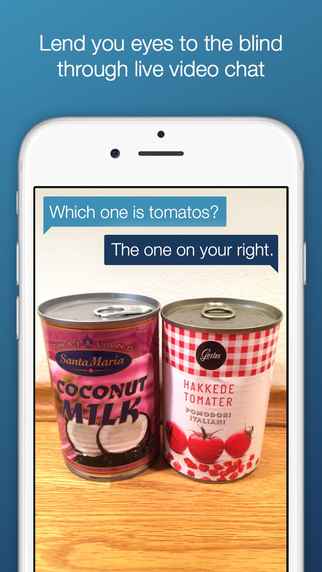
an image showing two cans - coconut milk on the left and tomatoes on the right. Blind person asks which one's the tomatoes. Sighted person's response is the right one.

We very well know that blind people are self sufficient and independent, and can go about their daily lives without much interruption. However, there are rare instances when they need assistance from someone else. 

What's the expiry date on the milk carton in my fridge? Do I have mismatched socks? Does this can have kidney beans or chick peas? Are these tomatoes or extremely ripe avocados?

It helps when someone's around but what if a blind person is by themselves?

To help blind people in such situations, a new iOS app, "Be My Eyes" lets them interact with another sighted person from anywhere in the world and ask questions similar to the ones listed above!

The concept is very simple. Blind people and sighted people register for this app. Blind people to ask questions and sighted people to answer them. Whenever a blind person has a question, they open the app and look for the first sighted person who offers to help. Sighted people, on the other hand, get notified that someone is seeking help. If someone is available to help, they accept the request. If they are not - no worries. There are tons of people out there who would grab that request. (13,000 people helpers signed up in just over a day to help 1,145 blind users). All the blind user has to do is turn on their rear camera and point it at the object they have a question about.The result: the blind user gets their question answered and everybody lives happily ever after!


It doesn't matter where they are - they  can be in one part of the world and still receive help from someone an ocean away!

The app also has a reputation system - the sighted people who are helping build a reputation based on their responses. If someone tries to be clever and gives wrong responses, they are flagged by the system and ousted within no time. So if you are trying to play a prank on a blind person - beware!

The app is free and has already received more than 2,000 requests. If you or someone you know is blind, you may want to definitely take advantage of this unique yet free app.

Download app here.
Website: Be My Eyes

Source: Engadget

Senin, 08 Desember 2014

OtoSense Mobile App: Re-Imagining Alerting Devices For Deaf, Hard Of Hearing


For Joyce Edmiston, 55, who admits she can�t hear her oven timer beeping when she removes her hearing aids, even if she�s in the kitchen, says lack of awareness of these audio alerts and other sounds can be a real problem. 

OtoSense, a sound recognition software company, has developed the first mobile app that identifies and distinguishes the source of incoming audio alerts, including alarms, sirens, timers, bells and other sounds, turning smartphones and tablets into assistive alerting devices for the deaf and hard of hearing. 

Joyce, who runs http://xpressivehandz. blogspot.com is seen here with an award.
Joyce, who runs http://xpressivehandz.
blogspot.com is seen here
with an award.
For people like Joyce and Travis Dougherty, 33, who is deaf, OtoSense offers an adaptable, affordable and useful means of being notified of important sounds in their environment.

Wherever you go, it seems, people, young and old, are using smartphones and tablets. The real value of these devices, however, comes from the mobile applications. 

Smartphones have quite literally become the new form of an assistive device - the all-in-one system that is made all that more powerful with the mobile applications available to download. Today, there are apps that let you watch (even in closed captions), text, video chat, bank, shop, read, listen, take photos and movies, check the weather, traffic and even get updated arrival and departure times during busy holiday travel season. 

Travis, who admittedly is an early adopter when it comes to new technology, says that the time has come for alerting devices to evolve and �putting this kind of technology into a smartphone and tablet just makes sense.� 

Since the birth of his daughter, Travis now wears a Pebble smartwatch, which connects to OtoSense, and he will soon connect the app to his Philips Hue Lights when the next update comes out later this month. 

Most people today have their smartphone and/or tablet within arm's reach at all times, it's the portable computer in their pocket and charging it and keeping it running is important. Certainly that�s the case for Noelle Bell, 32, who has a cochlear implant. 

OtoSense works immediately upon download, coming with a built-in library of standard fire and smoke alarm sounds found in the U.S. and Europe. Additionally, OtoSense can be personalized by users, recording and storing the most significant sounds of their environment, notifying users via flash, vibration and third-party notification including SMS text and push notification.
Noelle Bell, founder/CEO of
Buzz Worthy Social Media.
For Noelle, who pairs OtoSense with her Pebble Smartwatch, says she�s taught the app the sounds of her alarm clock, the doorbell, oven timer and dog barking. 

�It lets me know the audio cues to participate in my environment, and has helped me not feel as isolated in trying to figure out all of the different sounds of modern life,� says Noelle. �For me, the sound of the oven beeping is very similar to the sound of my doorbell, and I�ve recorded both sounds and stored them in my personal library on OtoSense. Now I can distinguish the difference between the two, and that is a real benefit.�

OtoSense is available now on the Google Play store. When the iPhone and iPad versions come out later this month, the cost of the app, on either Google Play or the App Store, will be $4.99 with some additional in-app purchases. OtoSense connects to any smartwatch, alerting user via text and vibration of a particular sound they have recorded and want to be aware of. And with the launch of the app on the App Store, users will be able to connect the app to Philips Hue Personal Wireless Lighting, customizing notifications.


According to the World Health Organization, there are 390 million people who suffer from a disabling hearing loss. In the United States, there are 48 million people who report a hearing loss according to the Hearing Loss Association of America. 

Please follow OtoSense on Twitter at www.twitter.com/otosense, like us on Facebook at www.facebook.com/otosense, and Instagram at www.instagram/otosense. If you have questions or want to sign up for our email list, please go to www.otosense.com or email us atexplorers@otosense.com.

This guest blog post was writting by Kathryn M. Quirk. Kathryn leads marketing activities for OtoSense, bringing more than 15 years of experience developing and managing multi-channel communications programs across an array of business sectors. Kathryn has insatiable thirst for news and information, reading, listening and watching everything with eye for how she can develop and share good stories, with a preference for sharing stories about how technology helps people to live more independent and autonomous lives. Always in the back in her mind, are the words of Maya Angelou, who wrote, "People will forget what you said. People will forget what you did. But people will never forget how you made them feel."

Minggu, 14 September 2014

ModMath: Math App For Dysgraphic Children


This is another great story of how a parent decided to find a solution for her kid's disability by creating an app for him and several others who have dysgraphia and help them solve math problems on their iPads! This blog post was written by Dawn Denberg, the inventor of ModMath - an app designed specifically for people with dysgraphia.

One evening, after another homework-related meltdown, I voiced my frustration to my husband, stupefied that I couldn�t find anything to help our son.

When people ask me about the biggest stumbling block for my son, Henry, who has dyslexia and ADHD, I tell them that it is his handwriting. If they�re in the know about learning disabilities, I�ll use dysgraphia, the clinical term for horrific handwriting.

Speech-to-text programs, like Dragon NaturallySpeaking, are a godsend for kids like Henry. My son uses it for almost every subject. It�s useless, however, for mathematics.

This is a big problem because Henry�s handwriting is so bad that often he can�t read it. Because of his working-memory challenges, by the time he gets to step two of any equation, he�s not sure if the number he wrote down was a 4 or a 9. As for creating number columns neat enough to effectively add, subtract, multiply, or divide multi-digit equations, forget it. A 5 from the 10s column, for example, will migrate to the space below a 7 from the 100s column. The final calculations are wildly off base.

Our only option was for Henry to dictate to me how to work through each problem. I wrote down what he said. This was not a workable long-term solution, unless he wanted me to be his college roommate some day. Every so often, I�d force him to work independently. This resulted in frustration, tears, and disappointment.

We tried lots of interventions, everything from pencil huggers to alternative grip pens, and special paper with raised lines to keep his writing more uniform. Years of occupational therapy went nowhere, as did more controversial interventions like vision therapy. Through it all, I searched for an assistive technology to solve this problem. I queried teachers, learning specialists, and other parents in the LD community. I scoured the Internet for leads, but I found nothing.

One evening, after Henry had gotten through another homework-related meltdown, I voiced my frustration to my husband, stupefied that I couldn�t find anything to help our son. I wasn�t looking for a solution, just a sympathetic ear. My husband, though, doesn�t like talking about problems without talking about solutions. Sometimes, I feel like bitching, and sometimes he�s willing to listen. But sometimes we both end up irked by our personality differences. In this case, however, his pragmatism was a stroke of genius. �Why don�t we make one?� he suggested.

So began our journey to create a math app that could help not just our son but any child who struggles with dysgraphia. It�s called ModMath, and it works on an iPad. (You can download it on itunes.apple.com or on modmath.com). It eliminates the need for students to write out math equations longhand. Think Excel, but without a calculator. Kids use the touch screen and on-screen keypad to set up and solve problems. Henry can now work through complicated math concepts � multiplying multi-digit numbers, doing long division, and regrouping and adding fractions with different denominators. The app lays out assignments on virtual graph paper that can be printed out or e-mailed to the teacher. When a child does make a calculation error, his teachers see where he went wrong and offer guidance because the calculations are �written� clearly in front of them.

Don�t be too impressed with our ingenuity. We didn�t write a single line of code. My husband is a creative director and co-owner of a boutique ad agency. He regularly contracts with software developers to create content for clients. So we knew where to go to get the job done.

Friends and colleagues were incredulous that we decided not to charge for the product. �Anyone who has an iPad can afford an app that costs a couple bucks� was a refrain we heard a lot. We don�t disagree with that logic, but our goal is to get ModMath into the hands of as many LD kids as possible. If we don�t charge, the media is more willing to give us free publicity. This increases our opportunity to reach the children and families who need it most.

We hope to create a ModMath 2.0 with additional features. However, we�ve already over-invested in our first app. Download the app and let us know how it has helped your child. We�d love to hear from you at contact@modmath.com.

photo of dawn denberg
Dawn Margolis Denberg is a San Francisco-based freelance writer. Her 12-year-old son Henry, who has ADHD and dyslexia, inspires her daily with his ingenuity, creativity, and zest for life. She will be launching a Kickstarter campaign soon to fund an update to ModMath which will allow students to work out algebraic equations. She hopes to build an Android version with similar capabilities.

This blog post originally appeared on ADDitudemag.com

Jumat, 12 September 2014

Spell Master: App That Improves Spelling Skills For Blind Children

Spell Master main screen

What's great about technology, especially in this decade is that everyone has access to a plethora of information and resources that can help them easily find and/or create exactly what they are looking for. This is a huge blessing when it comes to assistive technology because more and more parents are taking things in their own hands using technology to come up with accessibility solutions for their kids instead of waiting for a developer to create something and mass market! Spell Master, an app created by Ruchi Patil, is a great example of that.

Ruchi Patil is a mother of a 10 year kid who is blind. He is a voracious reader and an exceptional
Spell Master menu JAWS user. But because he couldn't practice how to spell words using a computer, his spellings were a little weak. To take care of this problem, Ruchi went on to create an iPad app that lets him practice spellings on the go! She emails him a list of words that she wants him to practice and he emails her the results right away straight from Spell Master. Since it is on the iPad, it is more like a game which helps in garnering more of kids' interest and attention. Ruchi's son also attaches an external keyboard to his iPad to type into it. Spell Master also allows kids to test their spellings in various other languages besides English. Sample tests for French, Spanish, and Hindi are included in the app.

It's a simple yet great concept for teaching visually impaired children at a very young age to spell words right. Spell Master is available on the app store for $4.99 and requires iOS 7.0 or later.

The app in itself is amazing, but it is  also a great step towards encouraging parents to develop apps for their kids and loved ones to fulfill their needs!

iTune Store Link: Spell Master

Minggu, 24 Agustus 2014

Assistive Technology Gadgets That Could Change Your Life [Infographic]

Are you or someone you know an Occupational Therapist and/or take care of someone with special needs? Michael Leavy at Home Healthcare Adaptations, a family run company has created this helpful infographic that shows some really useful assistive technology devices that can make life convenient for a lot of people. 

An electric car that people in wheelchairs maneuver  without getting off and folding the wheelchair separately? A gadget that translates head movements into computer mouse movements? Alarm clocks for the deaf? Bookmark this handy infographic for quick reference to some really cool assistive technology gadgets. (click to enlarge)

infographic titled assistive technology gadgets that could change your life
Click to enlarge

Source: Michael Leavy

Selasa, 19 Agustus 2014

A Blind Legend: Video Game For Blind People


poster of A Blind Legend showing a knight with a horse walking towards a mountain. Right below is shown a man wearing headphones and playing this game on his mobile device.

In A Blind Legend, your eyes will be of no help
So close them, sharpen your hearing and your blade�
and embark on an epic, perilous rite of passage.

For the sighted, playing a video game without any video may not make sense at all. But for the blind, it may be the next best thing since sliced bread.

The concept of "video-less" games is being adopted by more and more game developers who want to make video games accessible so that blind people could play them without any trouble. One of the games that will be coming out soon (early 2015) is "A Blind Legend" developed by Dowino studios in France after successfully completing a recent crowdfunding campaign. This is a game in which you play Edward Blake, a knight who has no eyes  and is on a mission to rescue his kidnapped wife. He is accompanied by his daughter Louise, who gives him directions and helps him navigate the environment and  fight Thork's army. There are forests, mountains, dungeons, a furious sea, lots of other obstacles and combat against numerous enemies!


Image shows various gestures used in this game.
Click to enlarge
This game does not have a video but rather a realistic, 3D sound environment which is most effective when heard using headphones. The sounds coming from different directions help you navigate and take appropriate action. A Blind Legend is very intuitive, and since it is a mobile game, there are various simple gestures that define different actions.

Dowino is aiming to offer non sighted gamers a video game that will give them a rich storyline and an immersive experience, not just a "game" that does things using audio. Once released, this game will be available free of cost for iOS and Android. A demo of the game is available on Dowino's website in English and French for both Windows and Mac. It can be downloaded from here.

To get a feel of what the sound is like, put on your headsets and listen to this clip. 


More from the developers here:


To read more about this A Blind Legend and other similar games, and to know what binaural technology is (that's used in this game), hit the source link.

Source: BBC
Websites: A Blind Legend, Dowino
Social Media: Facebook, Twitter, SoundCloud

Jumat, 07 Februari 2014

How Do Blind Users Use Smartphones?

blind user using smartphone


There are several things that are just not easy to understand if you don't have any sort of exposure to them. One of those several things that (especially sighted) people have a hard time understanding is how blind people use smartphones? A device with just a flat screen and one to maybe four physical buttons was the bane of many blind users when it first came out, but we all know that things have changed in the last so many years, and phone have become really accessible. But what does that mean (especially to sighted users who are not necessarily familiar with accessibility)? How does accessibility help blind users? What do they do different with their phones to do what sighted users would do? What kind of apps do they use on their phones?

So many questions!

Jonathan Mosen couldn't have done a better job explaining how and what for would a blind user use their smartphone. See him explain how to turn on voiceover on iDevices, and use it to navigate through apps and use them. He also enlightens us about some special apps specifically for blind users (an app that lets you take pictures of an object and searches a crowdsourced database to identify it) that make use of the smartphone a breeze and also enhance their user experience.

Last but not the least, he emphasizes how important making apps accessible is only because there are more and more blind people using smartphones now. If you are a developer, you cannot afford to ignore accessibility.

Watch this amazing video and share it! This is good knowledge for anyone and everyone!


Source: Twitter
Image source: New York Times

Minggu, 15 Desember 2013

Unus Tactus Lite And Enhancements To Full Version

Unus tactus interface shows geofencing - a radius of 1 mile set for a user.Unus Tactus interface shows pictures of contacts with help button


A while ago I wrote about this wonderful yet simple app called Unus Tactus that provides an easy interface for people with motor/ cognitive deficits to make phone calls and notifies their emergency contacts if they get disoriented or lost and exit the "fence" (a radius in miles that has been set for them that's considered safe) . Recently, Unus Tactus released the lite version of the app that lets you try and test it before you buy the full version for $9.99. The lite version lets you add just one contact and does not have "geofencing" capabilities.

In the full version of the app, some features have been added and refined, like:
  •     Easy set up and editing of an unlimited number of photo/phone contacts.
  •     Alphabetizing of contacts with picture and name display of every contact.
  •     Customizable emergency contact e-mail and phone number.
  •     Emergency button for fast help with a Google maps link to ID phone caller location.
  •     E-mails with a map link location sent to the emergency contact after every outgoing call
  •     �Geo-fence� feature with 5 different distance settings up to 15 miles.
  •     Automatic e-mail with Google Map and, iCloud link if phone exits geo-fence area with out call being made. (All E-mail notifications are On/Off switch able).
Check out this video to see how easily the app can be set up. 


The lite version can be downloaded here, and the full version here.

To read the full press release that has more details on the app and new enhanced features, go here.

Unus Tactus website: www.unustactus.com 


Minggu, 25 Agustus 2013

CanTunes And CanPlan: iOS Apps For Cognitive Impairment

There are certain simple interests we all have that bring us immense pleasure. Needless to say, one of them is listening to music. Thanks to digital music and portable music devices, listening to music is much more fun, and the experience is more special. But what if someone has cognitive impairment and finds maneuvering regular music applications like iTunes difficult?

CanAssist, an assistive technology organization, has released an app for iOS with a minimal interface that helps people with cognitive disabilities play music on their iPhones and iPads with utmost east. CanTunes, a $.99 app on the app store, does not require knowledge of traditional music player buttons (play, pause, rewind, forward, etc.). The interface displays all the album covers on the device in the form of a circular disc. Tapping the album cover starts playing the music and spins the album art continuously, indicating that it is playing. Tapping the  same album art stops the music. You can also tap a different album cover to play that album and stop the current one. As simple as that!

CanTunes interface displaying four album arts

This app also has sleep mode to turn off music after a certain period of time, and is also compatible with VoiceOver.

The same organization has developed another useful app called CanPlan which is a task management app that helps people with a range of cognitive challenges to complete activities with greater independence and confidence.

To set things up, a user would work with a support person and take pictures of each step in a task. For example, for all the steps required to make coffee (get coffee grinds, get filter, etc.), they can take pictures of every step, caption them and create a task. Whenever the user needs to perform that task, they will just go through all the steps one by one in CanPlan and finish that task. These tasks can also be scheduled - they can set reminders for themselves, so at a certain time of day, a message will alert them to perform that task, and they can go through all the steps one by one to accomplish it.

Watch this video for a simple demo of this app.


The free version of CanPlan supports a maximum of 3 tasks. The full version, which supports an unlimited number of tasks, is available for purchase from within the free app.

Minggu, 14 Juli 2013

Glove That Helps Deaf-Blind People Communicate

Image Source: The Atlantic

Tom Beiling, a 32 year old doctoral candidate in Berlin, has come up with a glove that just might revolutionize the way deaf-blind people communicate, at least in the form of texting. 

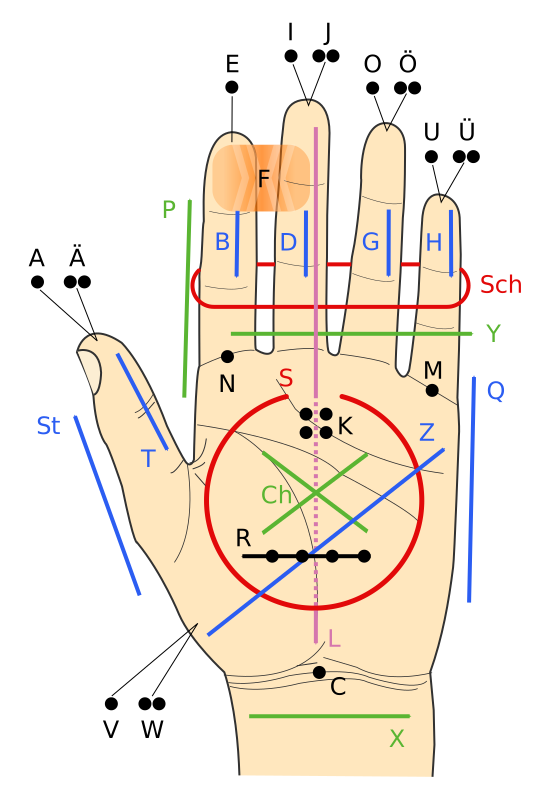
Image showing Lorm alphabetWith the intention of making communication easier between people who cannot see and hear, Tom has developed a glove that translates texts into pulses (haptic feedback). The glove consists of a set of pressure sensors, and with the help of a bluetooth device, connects to an iPhone app. The glove uses the Lorm alphabet (which places letters at different parts of  the hand (see image)), and a pressure sensor is placed at the locations that are meant for letters (for example, fingertips are meant for vowels). 

When someone needs to send text, the user just pushes the sensors meant for the alphabets that comprise of the words that they are wanting to send, and the haptic information from the tapping is converted to digital text and sent to the iphone app that sends out the message to the intended recipient. When the recipient receives the text, the motors on their glove vibrate and translate the words into vibrations, and they feel the vibrations on the pressure sensors. The vibrations essentially spell the words out. 

One advantage of using this glove to communicate is that you don't have to know Lorm alphabet to communicate  with  someone who is deaf-blind - the app converts digital text to Lorm alphabet for them. Till now, one had to know Lorm alphabet in order to communicate with people with deafblindness. 


The glove is still a prototype. Beiling's next prototype would probably be made out of material that is thinner than the one used for the current prototype.

Source: The Atlantic

Minggu, 12 Mei 2013

I-Limb Ultra: Prosthetic Hand Controlled By iPhone App


picture of patrick kane holding an object with i-limb

Someone once sad �there�s an app for that,� and they weren�t wrong! In today�s society, everyday life is being made easier by apps on smart phones which can do anything from letting us check our bank balance on the move to helping us avoid the traffic on the school run. But the category that has shown the biggest boom in downloads are the medical apps. These range from apps that can help patients to control their long term illnesses, to apps that can allow doctors to visualise their patient�s x-ray radiographs on the move. 

picture of i-limb's iphone appOne app that has made a big difference to patient�s lives is the iBGStar Diabetes Manager, and other
apps like it. They are used by diabetic patients to measure their blood sugar levels and keep track of previous reading to ensure they have good control over their condition. This is not only easier for the patient than the old �diary� method of recording their blood sugars, but it can help their doctors to see how treatment is working for their patient and whether it needs to be changed.

picture of patrick kane holding an object with i-limbThe award for the most innovative and life changing app must go to the i-Limb Ultra from Touch Bionics: the app is connected to a bionic prosthetic hand via Bluetooth and users can select different �grips� for any specific tasks they need to do. Sounds like something out of a movie, right? That�s what 16 year old Patrick Kane thought when he was fitted with the bionic hand. He lost his
hand as a baby due to meningococcal septicaemia, but because of this revolutionary new device he is able to live a normal life again, something that we often take for granted. The hand allows Patrick to carry out movements that are so precise they have not been possible with a normal prosthetic in the past: he can now hold a glass, pick up a piece of paper and tie his shoelaces with the touch of a button on his iPhone.

diagram showing how the i-limb works


picture of i-limb's iphone appThe limb can be controlled by electrical signals in muscles as well as by the iPhone, but this does take some practice to master as Patrick has already learned: "Controlling the hand feels very natural, although it does take a bit longer to learn how to use the automatic grips and gestures, so it was very useful to be able to work with the Touch Bionics therapist on these skills."

This innovation is a huge step for people like Patrick. At the moment the limb is still very expensive, between �30,000 and �80,000, but this technology means that in the not so distant future people that have lost a limb will be able to have the same quality of life as those who haven�t been so unlucky.


This article was written by Niqui Stubbs, a 4th year medical student with a love of gadgets and technology. She has worked with people who have lost a limb and knows the huge impact a bionic limb like this can have on someone�s life.

Sabtu, 02 Februari 2013

ASETNIOP Keyboard: A Revolutionary Keyboard For People With Disabilities

asetniop keyboard on ipad
The QWERTY keyboard has been around for ages and is the de facto standard for all devices we use that involve typing. However, it may be does not provide too much flexibility to people who may have visual impairment, not so good motor skills or over flexible joints (think Ehlers-Danlos syndrome). Of course,  another limitation, if I may, of QWERTY keyboards is that it if it's being used on a touch device like a tablet, it occupies a substantial amount of real estate which may be frustrating for people with low vision who may want to see a larger amount of enlarged text at a time on the screen.

asetniop keyboard layout
To solve all these problems, and to essentially allow users to type wherever they want to (that's a bold statement, isn't it?!), Zack Dennis has devised the smarter, flexible ASETNIOP keyboard that only consists of 10 (one for each finger) invisible keys! A single tap on the  eight "finger" keys produce one of the ASETNIOP characters, and the two thumbs are used for "space", "enter" etc. The rest of the letters are produced by pressing two fingers at the same time - a two key combo, if you will, which are known as chords. These chords can be used to store commonly used words, automatic correction, and text predictions. With the ASETNIOP keyboard, what matters is which fingers are pressed down.

The best part about this keyboard is that its size can be adjusted to provide ample space for all ten fingers to press down comfortably. The visualization below depicts how uniformly the finger taps are distributed across the keyboard.

asetniop keyboard distribution of finger presses


To watch a demo of this keyboard, watch the following video:


The ASETNIOP keyboard is available for the desktop and the iPad. Give it a shot!

Website: http://asetniop.com/

Read the full press release for more exciting information and to see a demonstration of someone typing 83 wpm on the ASETNIOP keyboard!


Kamis, 27 September 2012

Accessibility Enhancements in Google Apps

Google has made a ton of accessibility enhancements to some of its apps, viz., Drive, Calendar, Contacts, mobile apps (and others).  Some of the enhancements are:

- Including OCR in Google Drive to allow screen readers to read text from scanned PDFs and images.
- Over 450 webfonts launched in documents and presentations with basic accessibility support.
- Custom color picker added to Calendar to create better viewing experience for users with low vision.
- Basic keyboard controls improved for Gmail for mobile.

To see the extensive list of new features and bug fixes, visit this link.

Google has also created an Administrator Guide to Accessibility for technical administrators/ accessibility specialists etc. that gives them

- A summary of accessibility information for Google Apps.
- helps understand the current state of accessibility for each supported app in Google Apps.
- best practices for implementing Google Apps to support users' accessibility needs.

Selasa, 07 Agustus 2012

Call for Proposals for Assistive and Accessible Mobile Applications for 2012-13

Wireless RERC project directors
Image Source: Wireless RERC website
The Wireless Rehabilitation Engineering Research Center (Wireless RERC), creator of access to wireless technologies to people with disabilities, is inviting developers to submit proposals to obtain financial support for creating assistive and/or accessibility apps for popular mobile platforms like iOS, Android, Blackberry 10, and Windows Phone.

The Wireless RERC's app development budget is approximately $90k, and the idea is to support the development of four new apps per grant year. The app will be released through every platform's appropriate channel (App Store, Google Play, etc.) or through Wireless RERC's App Factory. If the app is successful, the developer may be offered additional funding to add more features or to create the app for an additional platform.

Proposals will be evaluated on the following parameters:

  • The app addresses an important accessibility or assistive technology need. 
  • The app is unlikely to be developed in the commercial marketplace. 
  • The app is technically feasible and the technical capacity required for development is readily demonstrable by the developer. 
  • The projected lifetime of the app justifies the investment. 
  • The projected lifetime of the app justifies the investment.The app complements and does not duplicate other apps in the marketplace or under development.

For the 2012-13 grant year, proposals need to be submitted by 15 September, 2012, and the final apps need to be delivered by August 10, 2013.

To read more details about the Call for Proposals, visit the website here.


Senin, 05 Maret 2012

Unus Tactus - Easy iPhone Interface For People With Motor/ Cognitive Deficits

Unus Tactus is a new iOS app that is designed to simplify the lives of people with mild cognitive and/ or motor deficits. The app creates an easy to use phone interface and adds quite many important features that can be easily used for making calls and in case of an emergency.

Unus Tactus creates an interface that shows all contacts in the phone in a 4x4 grid. Each grid has a contact's name and a big thumbnail of them. Calling them simply requires a tap on the thumbnail.


Another useful feature is the big help button on the app, which is available all the time. Whenever  the help button is pressed, two things happen: a phone call is made to an emergency contact, and at the same time a link is emailed to the emergency contact showing the person's exact location on Google Maps. 

The app also has a very interesting feature called Geofence which keeps track of the phone owner's physical location. If the person exits the "fence" (which can be set on the phone - 1 to 15 miles radius), an email with a link to that person's exact location on Google Maps, and an iCloud link (for tracking in real time if the emergency contact knows the phone owner's iCloud login) is sent to the emergency contact. 

Both these features can be especially helpful to people who suffer from Dementia, Parkinson's, Alzheimer's, or any other disease that affects judgement, cognition etc.


The idea behind the app is to give peace of mind to caregivers, and to assure them that their loved ones are safe. Although this app is meant for people with cognitive deficits, I see this app as a very useful tool for even people with visual impairment who may use the help button if they get lost during their daily travels, or exit their "geofence". People with low vision too may find the big thumbnails very helpful for making calls.

Currently, this app is only available for iOS (4.2 and above) for $9.99. Go to the Apple app store to buy this app.

To visit the developer's website, click here. The developer also has a Facebook page (Unus Tactus) and a twitter handle (@unustactus).
Mas Kur. Diberdayakan oleh Blogger.

 
biz.