Tampilkan postingan dengan label smart phone. Tampilkan semua postingan

Minggu, 10 Agustus 2014

Talkitt - App/ Software That Lets People With Speech Impairment Communicate In Any Language Using Their Voice

image showing talkitt for different devices - computer, tablet, smartphone, wearable devices like google glass and smart watch.


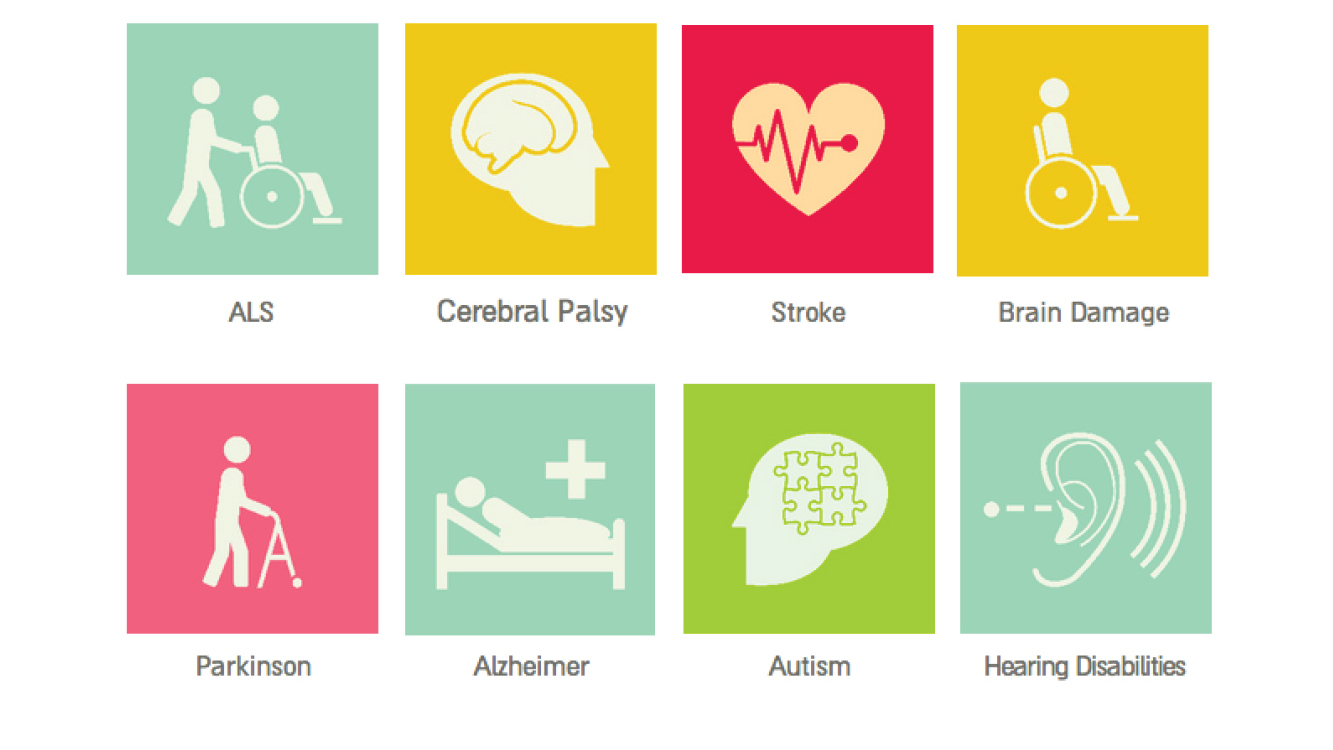
image showing various medical conditions that can cause speech impairment - ALS, cerebral palsy, stroke, brain damagem parkinson, alzheimer, autism, hearing disabilitiesIn many cases, disabled users with speech disorders find it extremely difficult to communicate, primarily because people around them have difficulty understanding their speech. Speech disabilities can be caused by a variety of conditions including Cerebral Palsy, Autism, Brain Damage, Parkinson's and many more. It is a struggle not just for those who have speech disorders but also for their caregivers and loved ones. In the recent past, various companies have come up with text to speech apps and software that let users either type or choose words that are spoken by the app, and thus help the users communicate. However, the one aspect that these apps sideline is the fact that the users are very much capable of speech and would ideally like to use their natural mode of communication.


a lady with speech impairment ordering coffee at a coffee shop using talkitt on a tablet.
Talkitt, a new "speech to speech" app in the works, plans to give disabled users more freedom and expression in the most natural way possible - it helps them communicate by just using their voice. Talkitt has the ability to recognize the user's vocal patterns and translate them into words that are more understandable. As you will see in the video below, it does a very good job of translating unintelligible pronunciation into perfect sentences with utmost accuracy. This also means that Talkitt works very well with any spectrum of speech severity - from mild to extreme.The best part about this app is that it is not just limited to English - it can translate any language the user is speaking! 

The accuracy of this app will let users gain more confidence, and encourage them more to use their speech to communicate, not to mention that it will make communicating easier and convenient for their family, friends, and caregivers as well.


Very soon, Talkitt will be available on all smartphones and tablets. The next phase will see it run on computers and wearable devices, giving much more flexibility to users wherever they are. Once Talkitt is available, there will be a monthly subscription charge of $19.99 per month.

Currently, it is being tested by various partners and hospitals in Israel and Europe, and there is also a Indiegogo funding campaign going through which the team behind Talkitt is raising money to get it out to the masses quick (as soon as Q1 of 2015). Visit the Indiegogo page if you want to contribute to this campaign.

Definitely watch the video below to see the inspiration behind this app and what the team is doing to make this app a reality.

Minggu, 15 Desember 2013

Unus Tactus Lite And Enhancements To Full Version

Unus tactus interface shows geofencing - a radius of 1 mile set for a user.Unus Tactus interface shows pictures of contacts with help button


A while ago I wrote about this wonderful yet simple app called Unus Tactus that provides an easy interface for people with motor/ cognitive deficits to make phone calls and notifies their emergency contacts if they get disoriented or lost and exit the "fence" (a radius in miles that has been set for them that's considered safe) . Recently, Unus Tactus released the lite version of the app that lets you try and test it before you buy the full version for $9.99. The lite version lets you add just one contact and does not have "geofencing" capabilities.

In the full version of the app, some features have been added and refined, like:
  •     Easy set up and editing of an unlimited number of photo/phone contacts.
  •     Alphabetizing of contacts with picture and name display of every contact.
  •     Customizable emergency contact e-mail and phone number.
  •     Emergency button for fast help with a Google maps link to ID phone caller location.
  •     E-mails with a map link location sent to the emergency contact after every outgoing call
  •     �Geo-fence� feature with 5 different distance settings up to 15 miles.
  •     Automatic e-mail with Google Map and, iCloud link if phone exits geo-fence area with out call being made. (All E-mail notifications are On/Off switch able).
Check out this video to see how easily the app can be set up. 


The lite version can be downloaded here, and the full version here.

To read the full press release that has more details on the app and new enhanced features, go here.

Unus Tactus website: www.unustactus.com 


Minggu, 14 Juli 2013

Glove That Helps Deaf-Blind People Communicate

Image Source: The Atlantic

Tom Beiling, a 32 year old doctoral candidate in Berlin, has come up with a glove that just might revolutionize the way deaf-blind people communicate, at least in the form of texting. 

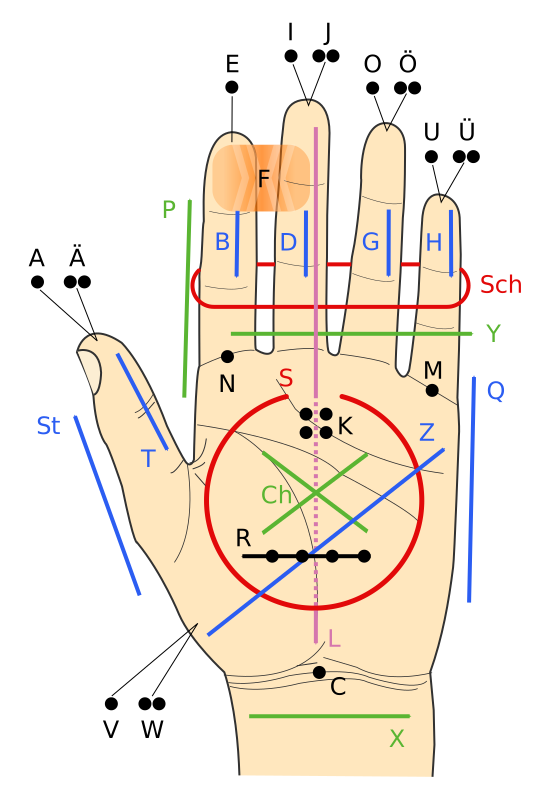
Image showing Lorm alphabetWith the intention of making communication easier between people who cannot see and hear, Tom has developed a glove that translates texts into pulses (haptic feedback). The glove consists of a set of pressure sensors, and with the help of a bluetooth device, connects to an iPhone app. The glove uses the Lorm alphabet (which places letters at different parts of  the hand (see image)), and a pressure sensor is placed at the locations that are meant for letters (for example, fingertips are meant for vowels). 

When someone needs to send text, the user just pushes the sensors meant for the alphabets that comprise of the words that they are wanting to send, and the haptic information from the tapping is converted to digital text and sent to the iphone app that sends out the message to the intended recipient. When the recipient receives the text, the motors on their glove vibrate and translate the words into vibrations, and they feel the vibrations on the pressure sensors. The vibrations essentially spell the words out. 

One advantage of using this glove to communicate is that you don't have to know Lorm alphabet to communicate  with  someone who is deaf-blind - the app converts digital text to Lorm alphabet for them. Till now, one had to know Lorm alphabet in order to communicate with people with deafblindness. 


The glove is still a prototype. Beiling's next prototype would probably be made out of material that is thinner than the one used for the current prototype.

Source: The Atlantic

Selasa, 11 Juni 2013

App That Helps Visually Impaired People Take Pictures


A person taking a picture with a smartphone
Dustin Adams, a PhD student at the University of California, has recently created an app that lets blind/visually impaired photographers take pictures with their phones. Tackling common questions like "I don't know if I am focussed correctly", "I am unable to distinguish buttons on my camera unless I pull out my magnifier", and several lighting questions among various other things, the app makes taking pictures a breeze. A photo can be taken by a simple upward swipe on the phone screen. It detects all the faces in the frame and speaks the number out to the photographer so they know if all the subjects are in the photo. There are audio cues that help the photographer keep the main shot in the frame and focus. 


The app also records a 30 second audio to help the photographer remember who is in the shot as well as GPS data that tracks which city/neighborhood the picture was taken in. From the screenshots available in the research paper, it looks like this app is being made for iOS.

Do read the very interesting paper that Dustin Adams published to find out survey results and all the effort and direction that was put in this app to make it a success.

Source: NewScientist, University of California at Santa Cruz via Engadget
Photo source: Mundobit

Minggu, 12 Mei 2013

I-Limb Ultra: Prosthetic Hand Controlled By iPhone App


picture of patrick kane holding an object with i-limb

Someone once sad �there�s an app for that,� and they weren�t wrong! In today�s society, everyday life is being made easier by apps on smart phones which can do anything from letting us check our bank balance on the move to helping us avoid the traffic on the school run. But the category that has shown the biggest boom in downloads are the medical apps. These range from apps that can help patients to control their long term illnesses, to apps that can allow doctors to visualise their patient�s x-ray radiographs on the move. 

picture of i-limb's iphone appOne app that has made a big difference to patient�s lives is the iBGStar Diabetes Manager, and other
apps like it. They are used by diabetic patients to measure their blood sugar levels and keep track of previous reading to ensure they have good control over their condition. This is not only easier for the patient than the old �diary� method of recording their blood sugars, but it can help their doctors to see how treatment is working for their patient and whether it needs to be changed.

picture of patrick kane holding an object with i-limbThe award for the most innovative and life changing app must go to the i-Limb Ultra from Touch Bionics: the app is connected to a bionic prosthetic hand via Bluetooth and users can select different �grips� for any specific tasks they need to do. Sounds like something out of a movie, right? That�s what 16 year old Patrick Kane thought when he was fitted with the bionic hand. He lost his
hand as a baby due to meningococcal septicaemia, but because of this revolutionary new device he is able to live a normal life again, something that we often take for granted. The hand allows Patrick to carry out movements that are so precise they have not been possible with a normal prosthetic in the past: he can now hold a glass, pick up a piece of paper and tie his shoelaces with the touch of a button on his iPhone.

diagram showing how the i-limb works


picture of i-limb's iphone appThe limb can be controlled by electrical signals in muscles as well as by the iPhone, but this does take some practice to master as Patrick has already learned: "Controlling the hand feels very natural, although it does take a bit longer to learn how to use the automatic grips and gestures, so it was very useful to be able to work with the Touch Bionics therapist on these skills."

This innovation is a huge step for people like Patrick. At the moment the limb is still very expensive, between �30,000 and �80,000, but this technology means that in the not so distant future people that have lost a limb will be able to have the same quality of life as those who haven�t been so unlucky.


This article was written by Niqui Stubbs, a 4th year medical student with a love of gadgets and technology. She has worked with people who have lost a limb and knows the huge impact a bionic limb like this can have on someone�s life.

Jumat, 07 Desember 2012

Tommy Edison: What's It Like To Be Blind

There are two reasons why someone wouldn't know who Tommy Edison is - 1) They've been living under a rock, or 2) They don't use the Internet AT ALL.

Tommy Edison, who has been blind since birth, is a movie critic. He watches movies but cannot see what's going on. That's why his focus is always on the writing and acting. But that's not all he does, and this post is not about his movie reviews.

If you've ever wanted to know how blind people lead their lives, then you should not miss Tommy's Youtube channel. He has videos that show him doing everything that a sighted person does, but because  he is blind, seeing him perform regular tasks with extra struggles which sometimes result in catastrophes, puts everything in perspective.

How does he use a DVD player? ATM Machine? How does he cook? How does he use paper money? How does he cross the road? What does he see in his dreams?

These are things that we do on a daily basis, but never really pay too much attention to the effort involved in performing them. For a blind person however, there are extra things that they need to take care of, especially in the public.

Recently he explained what colors mean to him. Although he has never seen colors in his entire life, they still have meaning for him. He associates colors with certain things, and it's amazing to see how what colors to us are what they are not to him.


Check out his Youtube channel to understand how blind people lead their lives, and to understand the difference between how blind and sighted people function.


Tommy's Youtube channel: TommyEdisonXP
His website: Blindfilmcritic

Source: Gizmodo

PS: There's one question that I have been asked by quite a number of people - how do blind people use smart phones? 

Well, I think nobody can answer that better than Tommy himself. 


Selasa, 07 Agustus 2012

Call for Proposals for Assistive and Accessible Mobile Applications for 2012-13

Wireless RERC project directors
Image Source: Wireless RERC website
The Wireless Rehabilitation Engineering Research Center (Wireless RERC), creator of access to wireless technologies to people with disabilities, is inviting developers to submit proposals to obtain financial support for creating assistive and/or accessibility apps for popular mobile platforms like iOS, Android, Blackberry 10, and Windows Phone.

The Wireless RERC's app development budget is approximately $90k, and the idea is to support the development of four new apps per grant year. The app will be released through every platform's appropriate channel (App Store, Google Play, etc.) or through Wireless RERC's App Factory. If the app is successful, the developer may be offered additional funding to add more features or to create the app for an additional platform.

Proposals will be evaluated on the following parameters:

  • The app addresses an important accessibility or assistive technology need. 
  • The app is unlikely to be developed in the commercial marketplace. 
  • The app is technically feasible and the technical capacity required for development is readily demonstrable by the developer. 
  • The projected lifetime of the app justifies the investment. 
  • The projected lifetime of the app justifies the investment.The app complements and does not duplicate other apps in the marketplace or under development.

For the 2012-13 grant year, proposals need to be submitted by 15 September, 2012, and the final apps need to be delivered by August 10, 2013.

To read more details about the Call for Proposals, visit the website here.


Rabu, 25 April 2012

EyeRing: Wearable Camera That Detects Objects For The Visually Impaired

EyeRing camera mounted on a finger
Image source: Engadget

Suranga Nanayakkara and Roy Shilkrot, researchers at MIT Media Lab, have developed a new bluetooth camera that can be worn on a finger and used to detect objects. This camera has been designed keeping people with visual impairment in mind, and can perform various tasks (based on the "mode" selected) that will not only help perform everyday tasks but also assist in self learning.

The concept of EyeRing is simple - a camera, connected via bluetooth to a phone or similar device that has voice output, is mounted on the user's finger. The user points the camera at an object and presses the shutter button on the side. The camera takes a picture of the object and sends it to the phone, which detects the object and provides a voice response back to the user.

Picture this: A visually impaired shopper goes to a store. He wears EyeRing on his finger and selects the "distance" mode and points ahead. EyeRing calculates the free space available and speaks out to the shopper. He then starts looking at shirts. He switches to "color" mode and points the camera at the shirts he is looking at. EyeRing detects the color of every shirt and tells the shopper what colors they are. He then switches to "tag" mode, and points EyeRing at the tag of the shirt he selected. EyeRing reads the tag and tells him the price printed on the tag. Finally, to check how much money he has, the shopper pulls out a couple of bills from his wallet and points EyeRing at them. EyeRing reads the denomination on the bills and tells the shopper how much the bills are worth.

Everyday shopping just got so much simpler and easier for visually impaired people!

EyeRing can also be used by little kids who are learning how to read. Instead of someone actually telling them what a word is, they can simply point EyeRing at the word, and using its OCR feature, EyeRing would speak the word back to the kid, thus enabling self learning without anyone else's assistance.

According to the source link, EyeRing is still buggy, but of course, it is still being worked on, and hopefully in the coming days/months/years would be out in the market and make every day life a lot easier for people with visual impairment.

Watch the following videos to see EyeRing in action. The first video shows how a shopper can use it at a store. The second video is of the researchers talking about EyeRing in more detail.


Source: Engadget, EyeRing website

Minggu, 22 April 2012

Mobile Accessibility Suite Free On Sprint, Boost and Virgin Mobile

Sprint, Boost Mobile, and Virgin Mobile subscribers in the US, who are blind or have visual impairment, can download a suite of accessibility apps  on their Android phones for free that usually costs $99. The suite consists of ten apps that are used by an average users on a daily basis  -

  • Phone - Make/ answer calls; manage call log.
  • Contacts - Manage contacts (even from Facebook).
  • Calendar - Manage and view calendar entries.
  • SMS - Send, receive and manage text messages.
  • Alarms - Set alarms.
  • Email - Full access to Gmail account.
  • Where Am I - Tells current location.
  • Web - Internet.
  • Apps - Access all apps on your phone.
  • Settings
The suite also does the following:
  • Screen reader
  • Date/time, battery level, network coverage, missed calls etc.
This suite can be downloaded on any phone that has Android 2.1 and above. To use the screen reader feature of the suite, the phone should have a physical navigation button (like a trackball), and only works on Android 2.2 and above.

Watch the video to see a quick demo of Mobile Accessibility.


Visit the following link to read more about the suite, read the phone providers terms and conditions, and to download the suite on to your phone.

Mobile Accessibility on Google Play

Remember, you can still download this suite for $99 if you are signed up with other phone service providers.

Source: Engadget

Senin, 05 Maret 2012

Unus Tactus - Easy iPhone Interface For People With Motor/ Cognitive Deficits

Unus Tactus is a new iOS app that is designed to simplify the lives of people with mild cognitive and/ or motor deficits. The app creates an easy to use phone interface and adds quite many important features that can be easily used for making calls and in case of an emergency.

Unus Tactus creates an interface that shows all contacts in the phone in a 4x4 grid. Each grid has a contact's name and a big thumbnail of them. Calling them simply requires a tap on the thumbnail.


Another useful feature is the big help button on the app, which is available all the time. Whenever  the help button is pressed, two things happen: a phone call is made to an emergency contact, and at the same time a link is emailed to the emergency contact showing the person's exact location on Google Maps. 

The app also has a very interesting feature called Geofence which keeps track of the phone owner's physical location. If the person exits the "fence" (which can be set on the phone - 1 to 15 miles radius), an email with a link to that person's exact location on Google Maps, and an iCloud link (for tracking in real time if the emergency contact knows the phone owner's iCloud login) is sent to the emergency contact. 

Both these features can be especially helpful to people who suffer from Dementia, Parkinson's, Alzheimer's, or any other disease that affects judgement, cognition etc.


The idea behind the app is to give peace of mind to caregivers, and to assure them that their loved ones are safe. Although this app is meant for people with cognitive deficits, I see this app as a very useful tool for even people with visual impairment who may use the help button if they get lost during their daily travels, or exit their "geofence". People with low vision too may find the big thumbnails very helpful for making calls.

Currently, this app is only available for iOS (4.2 and above) for $9.99. Go to the Apple app store to buy this app.

To visit the developer's website, click here. The developer also has a Facebook page (Unus Tactus) and a twitter handle (@unustactus).

Rabu, 21 September 2011

FotoBabble: Add Voice To Your Photos

Sharing your photos with people with visual impairment just got a lot more easier and fun. Well, visual impairment may not allow them to see your pictures, but they would still love to hear  about your experiences, right? But what if they are far away from you - a couple of states, maybe an ocean away? That's when FotoBabble comes into the picture. FotoBabble is a web/mobile service that lets you add voice to your pictures. You can sign up for this service (it's free) and use either their website or iPhone app to create pictures with audio descriptions. You can either upload your own picture or choose one from Facebook, and add an audio description (maximum 60 seconds) to it.

Here is picture from FotoBabble with a very good audio description of the picture (click the play button at the bottom left corner of the picture to hear the audio).


Here is a quick tutorial on how to add audio to a picture using FotoBabble.


Website: www.FotoBabble.com
iPhone app (free): iTunes Store

Source: Mashable

Minggu, 28 Agustus 2011

DrawBraille - Braille Smartphone Concept


DrawBraille is a unique smartphone concept for the visually impaired that heavily uses the Braille System. Needless to say, this smartphone does not have a conventional screen.

DrawBraille phone concept is divided into two areas - the left side of the phone is the "display" or reading area which consists of 210 mechanical dots for alphabets and numbers, and the right side has a touch sensitive input area. This area consists of 4x5 squares (20 in total). The 6 squares in the middle represent the 6 Braille dots for a single character. The user simply has to perform a three step process - touch, slide, and lift, in order to enter a character.

Since the reading area can only display five rows at a time, there is a page up/down button on the top left that allows the user to scroll through infinite lines of text. The page up/down functionality can also be used in other applications like email, book reading, messaging etc.

There are five dots on the right edge of the screen that are used for battery status. Each dot represents 20% of battery life, so three "bumpy" dots would indicate that the battery is 60% full, and so on.

Photo gallery (via designbuzz.com).

Watch the video to see a quick demo of this unique concept smartphone.


Note: Let the video buffer for some time.

Source: Core77

Rabu, 13 Juli 2011

CATRA - Smartphone Accessory That Detects Cataract

woman using catra accessory with a smart phone.


CATRA is a highly portable, and easy to use accessory that attaches itself to a smart phone and easily detects cataract. Made from off the shelf components, and consisting of no moving parts, CATRA, developed by Ramesh Raskar's team at MIT, is being considered to be ideal for the developing world.

The user is made to look through the accessory and press a few buttons. Doing so allows the app to collect quantifiable data and create an attenuation map, which in turn helps detect cataracts.

Watch this (technical) video to know more about CATRA.


Note: Although the price of the accessory is not mentioned anywhere, the same team designed a similar accessory called NETRA for eye exams which costs $1.

For more technical details, and to read the paper, hit the source link.
Source: MIT
Mas Kur. Diberdayakan oleh Blogger.

 
biz.