Tampilkan postingan dengan label google. Tampilkan semua postingan

Selasa, 30 Desember 2014

Look At Me: Android App For Kids With Autism To Help Improve Eye Contact


There are over 60 million people around the world that have autism. Usually, children with autism struggle with making eye contact with others and displaying social skills. However, recent studies have found that autistic children love technology, especially smart devices. Keeping that in mind, Samsung, with the help of various psychologists, psychiatrists and designers has developed a free Android app that helps children improve their ability to make and sustain eye contact and interpret facial expressions.

The free app "Look At Me" uses the camera app of the phone and consists of seven interactive and engaging missions that make kids remember faces, understand a person's mood, and also lets them take photos of themselves exhibiting various expressions. Through this app, children are expected to learn diverse ranges of emotions like happiness, fear, and surprise. The addition of sound effects, point system and rewards along the way keep kids motivated.

Over a period of 8 weeks, 20 children, used the app daily for 15 minutes, and it was noticed that 60% of the children showed improvement in making eye contact.

If you know a child with Autism that may benefit from this app, head to Google Play to download and use this free app.


The "Look At Me" project is also donating 200 tablets with this app preloaded to families in Canada so they could share results and help the community. To know more or to join this project, follow this link.

Source: Samsung via Engadget

Sabtu, 29 November 2014

Google Glass: A Solution For People With Low Vision

Thanks to so many technological marvels around us, every question has not one, but many answers. It's amazing to see how people develop some really cool and concrete solutions with things they have access to.

Benjamin Yonattan is wearing Google Glass which substantially restored his vision caused by Retinal Dystrophy
Benjamin Yonattan is a passionate ballet dancer. He started dancing when he was five, and got really serious about it when he was nine. However, at the age of five, he also started losing his vision due to a visual disorder called Retinal Dystrophy which leads to a gradual and progressive loss of vision with age. As a 13 year old now, his vision has deteriorated to the extent that seeing with his eyes is like seeing through a straw. This was a major obstacle for a ballet dancer like him at dance conventions  with hundreds of people around him. He would bump into people or feel squished into a smaller area.

Thanks to serendipity and his mom's iPhone, Benjamin realized that putting the phone up to his eye, he saw a lot more than he did with his own eyes. The iPhone camera (or any smartphone camera) can capture a lot more detail and shrink it down in one little area. 

This is very easy to demonstrate too - if you make a little hole on your hand by curling your index finger (to the size of a straw) and then see through it, you will see very little. If you then place a phone camera in front of your "hand hole" and see through it, you will see a lot more detail on the screen.

This led them to pursue a much robust solution for Benjamin's vision - Google Glass! Since this device is wearable, Benjamin could have his hands free for other activities while having access to a substantial portion of his new vision. The first time he tried Google Glass, he was able to seven people in the room instead of the usual one without Glass. The following diagram shows how his vision improved when he started using Google Glass. It is to be noted that eventually, Benjamin will lose all of his vision.

Diagram showing how Benjamin's vision improved after using Google Glass


Google Glass seems like a pretty handy and fairly affordable solution for someone with low vision who wants more independence in performing daily activities without the need of another person or accessory. If someone is in need of a temporary solution, this definitely can be considered as an option.

Senin, 15 September 2014

TALK: AAC Device That Converts Breathing to Voice

Sixteen year olds are always busy making great inventions, right? 

photo of Arsh DilbagiArsh Dilbagi from India is a finalist in the Google Science Fair 2014 with a device that is possibly going to change the lives of many people with developmental disabilities.

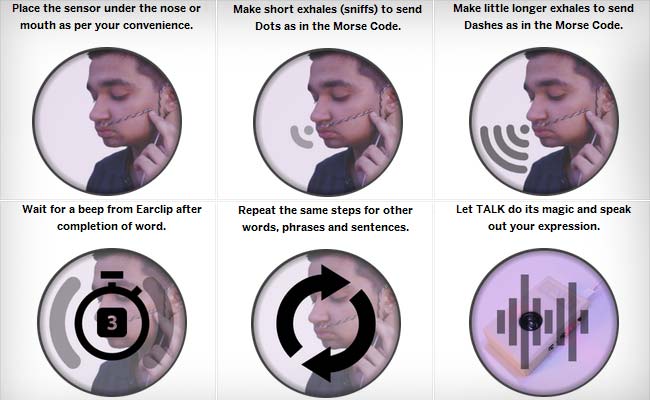
Arsh's invention, called TALK, is a new AAC device that let's a person with speech impairment and/or developmental disability to talk by using just their breath. The device has a sensor that is placed right below the nose or mouth, depending on the user. The user then breathes on the sensor in two types of bursts - a short burst for a dot and a longer burst for a dash. Yes, you guessed it right - this device is based on the Morse Code. These dots and dashes are then processed and converted into phrases and sentences by the internal processor and then sent to another processor that outputs the sentences into voice. 

TALK has two modes - one for communicating which is in English, and the other to gives specific commands which can be outputted in nine different languages and accents according to gender and age group. Arsh suggests that the price of TALK is only approximately $80 whereas other AAC devices that are generally used by people with motor-neuro disabilities can cost upward of $7,000. One significant advantage of this device is that since it is so small (the size of a cell phone), it can be carried by people with them all the time. They will also not be bound to a wheelchair to be able to use it. Another advantage is that people will not be twitching their muscles all the time thus causing muscle strains etc.

image showing how to use TALK
Click to enlarge
On a single charge, TALK can run for more than two days and is quite comfortable to wear.

Visit Arsh's Google Science Fair 2014 page to learn more about him and his project in greater detail. Don't forget to watch the videos below to get an understanding of what TALK does.


Source: Times of India
Image Sources: Google Science Fair 2014, NDTV

[Thank you for sharing, Savitha and Abhinav!]

Selasa, 19 Agustus 2014

A Blind Legend: Video Game For Blind People


poster of A Blind Legend showing a knight with a horse walking towards a mountain. Right below is shown a man wearing headphones and playing this game on his mobile device.

In A Blind Legend, your eyes will be of no help
So close them, sharpen your hearing and your blade�
and embark on an epic, perilous rite of passage.

For the sighted, playing a video game without any video may not make sense at all. But for the blind, it may be the next best thing since sliced bread.

The concept of "video-less" games is being adopted by more and more game developers who want to make video games accessible so that blind people could play them without any trouble. One of the games that will be coming out soon (early 2015) is "A Blind Legend" developed by Dowino studios in France after successfully completing a recent crowdfunding campaign. This is a game in which you play Edward Blake, a knight who has no eyes  and is on a mission to rescue his kidnapped wife. He is accompanied by his daughter Louise, who gives him directions and helps him navigate the environment and  fight Thork's army. There are forests, mountains, dungeons, a furious sea, lots of other obstacles and combat against numerous enemies!


Image shows various gestures used in this game.
Click to enlarge
This game does not have a video but rather a realistic, 3D sound environment which is most effective when heard using headphones. The sounds coming from different directions help you navigate and take appropriate action. A Blind Legend is very intuitive, and since it is a mobile game, there are various simple gestures that define different actions.

Dowino is aiming to offer non sighted gamers a video game that will give them a rich storyline and an immersive experience, not just a "game" that does things using audio. Once released, this game will be available free of cost for iOS and Android. A demo of the game is available on Dowino's website in English and French for both Windows and Mac. It can be downloaded from here.

To get a feel of what the sound is like, put on your headsets and listen to this clip. 


More from the developers here:


To read more about this A Blind Legend and other similar games, and to know what binaural technology is (that's used in this game), hit the source link.

Source: BBC
Websites: A Blind Legend, Dowino
Social Media: Facebook, Twitter, SoundCloud

Rabu, 23 Juli 2014

Google Glass For Prosthetics And Blind Athletes

Google Glass, 3D printing, Prosthetics! We have heard so much about these in the recent past, and we will keep hearing about them since things are progressing so well in each of these avenues! Today, we have two different stories related to Google Glass - one, that will help people get cheaper prosthetics, and two, a blind paralympian using Google Glass to show kids his point of view and boost their confidence.

Prosthetics With Google Glass


Researcher scanning lower leg of test subject with google glass


Traditionally, getting prosthetics requires traveling to a clinic where a huge measuring machine with a robotic arm determines the specifications for the needed leg brace or prosthetics. Of course, this process is not inexpensive since the machine itself costs tense of thousands of dollars, and typically, the clinic would like to pass on costs to clients.

researchers looking at 3d printing information for leg brace on a computer
This will soon hopefully change. A research team at University of Delaware is exploring more affordable and convenient ways to do the exact same thing, but without the additional exorbitant costs of getting prosthetics from a traditional clinic.

The team is using Google Glass to capture all the information of the foot and lower leg in videos. These videos are then stitched together to get a 3D model of the cast and then instantly transformed into a template for a 3D printer. This method will first of all, cut down costs for the patients and second of all, make it convenient to go through this process at home without even going to the clinic to get the measurements taken. The patient can print the leg brace at home if they have a 3D printer or send it to a 3D printing lab or studio.

The team will soon be applying for funding to expand into prosthetic manufacturing as well.

A combination of technology like Google Glass and 3D printing helps bring manufacturing to everyday consumers who are not engineers or manufacturers.

Google Glass And A Blind Paralympian


Disability advocates are always looking for different ways to showcase abilities, and not disabilities of disabled people. Google Glass will be used for just that purpose.

Lex Gilette is a blind paralympian who began to lose his sight when he was seven years old. He has won three silver medals and holds the world record for long jump for F11 classified athletes. Being blind, he has to depend on someone to direct him down the runway and make calls for him on the fly.

"No need for sight when you have a vision."

Lex's plan is to wear Google Glass and show his perspective to high school kids so they could see what all it entails, and how a blind paralympian does it. The idea is to show kids that everything is possible, and how being not able bodied does not cause hindrance to your goals. Through Google Glass, Lex aims to make high school kids more confident.


Hit the source links to read more about both the stories.

Minggu, 27 April 2014

Google Glass: For People With Parkinson's Disease?

Woman wearing google glass

Wearable technology has gained a lot of momentum in the last year or so. The most popular, or should we say notorious, wearable tech that has come out is Google Glass, which has received both praise and backlash from different groups because of all the things that it can do. Taking pictures, making videos, sending emails, finding directions, setting reminders - everything can be done with just a few voice commands or gestures. While society debates whether or not Google Glass should be allowed to be worn everywhere, there is a group of researchers that is busy making Google Glass extremely useful for people with a certain disease - Parkinson's.

Since Parkinson's causes shaking/tremors,  sudden stiffness of limbs , posture instability, "freezing" besides mood swings and cognitive changes, scientists at Newcastle University are exploring various ways to see how Google Glass can be used to help people with Parkinson's, thus providing workarounds to live a life that's not constantly hampered by symptoms that ultimately bring down confidence levels in the person dealing with them.

One area that's being looked at is setting reminders. Since patients are required to take medication everyday and on time, Google Glass can easily send regular reminders to the patient reminding that they should take their medication. Reminders would not only tell them when to take their medication but how/ with what (water; food - different combinations at different times of day).  Similar discrete reminders can be sent to the patient to remind them to swallow their drool - a common problem with people with Parkinson's disease because of lack of motor control. 

Another common symptom is freezing, where the patient just gets stuck and is unable to walk. In such cases, the patient would want to call someone who could come get them, but calling on a phone with a touch screen can become a big hassle for someone with not so good motor skills. Google Glass can be helpful in such situations because someone can be easily called by just using voice commands. Since it is always connected to the Internet, friends and carers will be easily able to see where the patient is, and would come and get them.

Google glass also has maps and directions. If someone is out and about, chances of them getting lost are minimal because Glass displays turn by turn directions too, thus providing relief to not just the patient but also family and friends.

This video shows the researchers tell us in detail about their research:


The research is still at its very early stages, but what the volunteers with Parkinson's, who helped test Google Glass, say is remarkable. They are happy with what they experienced, and they thought that Glass really helped them control symptoms and live a normal life. Hit the source link to read their testimonial. 

Let's hope we get to hear more about this research in the future!

Source: Newcastle University via Gizmodo
Image source: Ubergizmo

Rabu, 11 Desember 2013

Project Ray: The World's First Smart Phone For Blind And Visually Impaired Users

Project Ray phone

The smartphone revolution has brought a lot of comfort and convenience to practically everyone's fingertips. Looking for information, reading books, communicating with loved ones in not one but many ways, and even performing "real work" using a phone has become a way of life for us. Thanks to all the phone manufacturers and their dedication towards accessibility, blind and visually impaired users have had great success with smartphones.

However, the regular smartphone can be quite overwhelming for the average visually impaired user. The touch screen on a smartphone, which is the most essential component of the device, just doesn't have enough tactile clues to help a blind user navigate the menus. Voice commands work pretty well, but can still be frustrating to many. Also, for users who are not so tech savvy, less is more, and they desire something that's not too complicated.

Project Ray, an Israeli startup, has developed a phone that is specially designed keeping blind people in mind. The interface of the phone is robust, yet very simple, and makes most sense for people who are visually impaired. The touch screen consists of five to twelve icons or buttons, depending on where the user is in the navigation area. Every icon has a designated app. The user just needs to move their finger
A blind person using a project ray phonein a specific direction to open the app designated for that icon. Although the icons are laid out in the center of the screen, users don't necessarily have to "press" the displayed icon in order to open an app. Placing a finger anywhere on the screen enables the interface and the icon layout, and from that very location the user can move their fingers in any direction to open the desired app. The screen tracks the direction of the finger and does not require that an icon be clicked. Thanks to tactile feedback and voice commands, the user would know that their touch has been recognized and the required action would be performed.

The interface has been kept simple and minimal, yet all required functionalities have been provided. Navigating through multiple pages of apps is a breeze. Of course, the phone provides pretty much all standard features and applications that a regular smartphone has (favorites, full call logs, telephony, alarm clock, radio, voice recorder, calendar etc.). The in built camera also has currency recognition that can scan money bills and tell the user if it is a $5 or $100 bill. For people who like to read, audio books are available from the Library of Congress, Amazon, and others.

Project Ray has three models available that can be bought directly from their website, Amazon, and Odinmobile. There is also an Android simulator that can be downloaded from here if you want to see how it works.

Watch this demo video to see how easy it is to navigate the clutter free interface. A little bit of practice would make any user comfortable and using it on a daily basis would become a way of life.


There are more quick training videos on their Youtube channel.

Watch this video to see how others are using this phone.


Visit Project Ray for more details.

Kamis, 27 September 2012

Accessibility Enhancements in Google Apps

Google has made a ton of accessibility enhancements to some of its apps, viz., Drive, Calendar, Contacts, mobile apps (and others).  Some of the enhancements are:

- Including OCR in Google Drive to allow screen readers to read text from scanned PDFs and images.
- Over 450 webfonts launched in documents and presentations with basic accessibility support.
- Custom color picker added to Calendar to create better viewing experience for users with low vision.
- Basic keyboard controls improved for Gmail for mobile.

To see the extensive list of new features and bug fixes, visit this link.

Google has also created an Administrator Guide to Accessibility for technical administrators/ accessibility specialists etc. that gives them

- A summary of accessibility information for Google Apps.
- helps understand the current state of accessibility for each supported app in Google Apps.
- best practices for implementing Google Apps to support users' accessibility needs.

Bill Signed For Self Driving Cars On Public Roads

Self driving cars are a step closer to reality!

California governor Jerry Brown signed bill SB1298 two days ago which formalizes the legal and safety standards for automated cars so that they could be driven on state owned roads. This is good news for people with visual impairment and other disabilities (that hinder their ability to commute) because in the future, this self driving car would enable them to fearlessly commute without having to depend on others for transportation purposes.

Several important points were made during the bill signing ceremony, some of which were:

- Accidents are caused by human errors. The self driving cars have potential to avoid accidents.

- The "drivers", when stuck in traffic, can utilize their time doing something else, thus being more productive.

- Self driving cars have the ability to eliminate congestion.

- Last, but not the least, self driving cars do not jump red lights!

Of course, there is still a lot of testing that needs to be done. However, Sergey Brin thinks that the self driving car would probably be ready for public use in five years or so.

Watch the following video to see Sergey Brin and Jerry Brown talk about the self driving car and how these cars would change our lives.


Source: Google+ via Engadget

Senin, 23 April 2012

Blind Man Drives Google's Self Driving Car

"This is some of the best driving I have ever done."


Meet Steve Mahan - A man, having lost 95% of his sight, is way past legal blindness. Recently, he was asked by Google to test drive their self driven car, and the result is just mind blowing.

Watch the video to see Steve Mahan "driving" the self driven car, with Google employees giving him company. "Look ma, no hands" he says, as the Prius, decorated with Google logos, drives off on the streets. The video shows the car carefully and quite accurately maneuvering turns and entering a Taco Bell drive through where Steve orders a burrito. While driving, Steve is seen chatting with his co-passengers (of course with no hands and feet touching any of the controls).

The car is still not perfect, but according to Google, the self driving car project has completed more than 200,000 miles of computer assisted driving since 2010. From what we see in the video, the car is on the right track!


Hit the source links to read more.

Source: Google+ via The Verge
Mas Kur. Diberdayakan oleh Blogger.

 
biz.